cFos Traffic Shaping reduces delays during data transfer and allows you to surf the Internet up to three times faster. So you can use the full bandwidth of your connection!
During TCP/IP transfer, a certain amount of data needs to be confirmed upon reception before more can be sent. Stalling data confirmation results in delays and transfer-rate slowdowns, thus forcing the sender to wait. Especially for DSL and cable, it is possible to slow a download to a crawl by choking the upstream channel (which has the smaller bandwidth anyway) with an upload. This is because in such a scenario there is not enough upstream bandwidth left for data confirmation.
The standard solution so far has been to try and compensate for this by increasing TCP window size, thereby allowing more data to be sent without immediate confirmation. The main problem here is that this also leads to high ping times (latency) and significant delays during Webpage rendering. Latency of up to 2 seconds is not uncommon for TCP windows with a size of 64k. In short, huge window sizes just won´t let you achieve full download speed.
By contrast, cFos Traffic Shaping prioritizes data traffic in such a fashion that important packets zip past regular packets. This way, receipts always arrive in time, and uploads won't ever choke your broadband connection again!
cFos Traffic-Shaping technology recognizes a number of important packet types and prioritizes them not only to keep Internet traffic running smoothly but also to ensure particularly low ping times. This not only accelerates surfing and download speeds significantly, but it is also a decisive advantage for online gaming.
With cFos Traffic Shaping, you will notice measurable improvements and benefits like:
* Full download rate during upload
* Consistently quick response time while surfing the Web or running other applications
* Improved VoIP speech quality
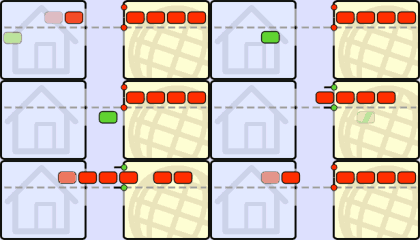
Normal data transfer:
Data reception needs to be confirmed (ACKnowledgment packets) before new data can be sent.
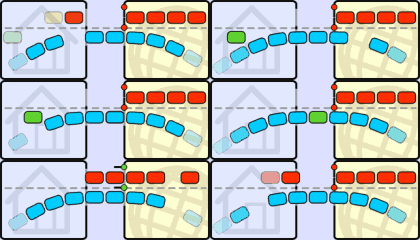
No Traffic Shaping:
ACK packets are stalled and delayed by a simultaneous upload. As a result, the download is slowed down as well.
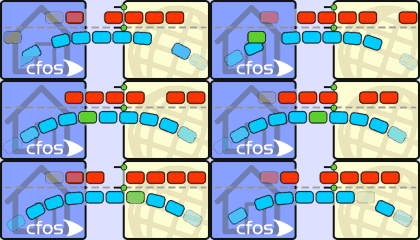
cFos Traffic Shaping:
ACK packets are prioritized in the upstream, allowing the download to continue at maximum speed.
More Information here.