BTC USD 84,268.9 Gold USD 4,157.68
Time now: Jun 1, 12:00 AM

PlayTV @ HyppTV -- HD lg tu!!!


Kemaskini Firmware Dekoder


1. Ensure your router L7router is "DEFAULT UNIFI" DNS setting, otherwise this method will not work.

First DNS 1.9.1.9
Second DNS 202.188.0.133

For those is not familiar with changing DNS here is the link :


2. Ensure your STB is connected to any port except port4 it's for IPTV connection. We need direct internet access.


3. Goto About menu. Ensure your App Version is v80163129. If else, please upgrade with default STB Streamyx configuration.


*/ This is additional setting for those still cant get upgrade link works.
*/ Goto Wireless and Network > Set Ethernet > Static IP. [Default DHCP]
*/
*/ i. It will be automatically field with your network setting.
*/ ii. Here manually insert DNS server 1.9.1.9 and backup DNS 202.188.0.133 and press OK.
*/
*/ After finish upgrade firmware please change it back to DHCP.
*/


4. Now you are ready to upgrade your STB Streamyx to STB UNIFI firmware.

i. Goto "System Upgrade"
ii. On the Server Address filed input this address "http://1.9.22.82:8082" and press confirm.
iii. Tick on "Upgrade Now"
iv. It should automatically starting a download bar graph and start downloading STB UNIFI.
v. After it finish downloading, it will automatically restart STB and start android recovery.
vi. Wait until it started home screen.


5. You now can see on About menu, your App Version is successfully upgrade to v80163311.

UNIFI114.jpg


6. Now change back to IPTV port no.4 at router.

7. Go IPTV setting change Field Switcher to HyppTV(UniFi). [Default Streamyx]
UNIFI19.jpg


8. Back to main screen click HyppTV and key in login details. Call UniFi to obtain if installer tak ada bagi.

9. It will reboot automatically to reconfigure system.

10. Done!!
 
Last edited:
dah godek2 SWOTT_MD.apk tapi tak nampak pulak settings yg membolehkan SYFY HD di tonton :D

bg clue sikit


Kemaskini Firmware Dekoder Cara Ke2


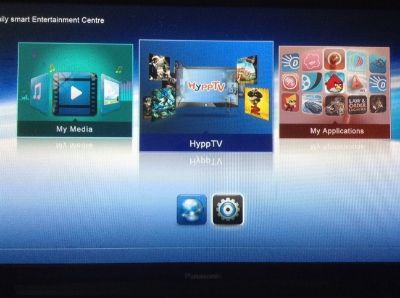
1. First go to HOME menu button on your remote. It will appear this menu.

IMG_0004.jpg


and then press on the gear (settings) button.


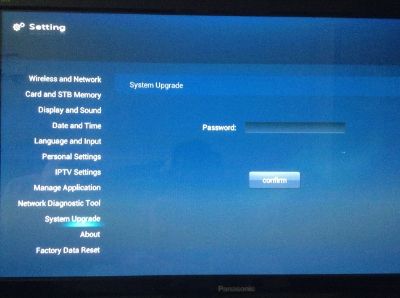
2. Now scroll down to "System Upgrade" and press OK on remote button.

IMG_0005.jpg


3. Inside "System Upgrade" you will see it ask for password. Password are 3008. Then press down to "Confirm" and press OK on remote button.

IMG_0005.jpg


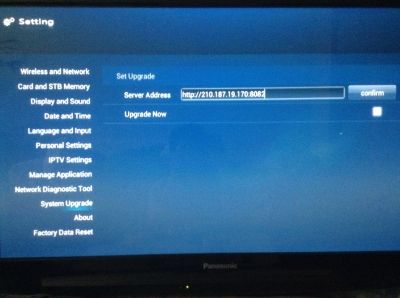
4. Inside "Set Upgrade" it has "Server Address" and copy the url (http://1.9.22.82:8082) , and press left or back to exit.

IMG_0006.jpg
 
Last edited:
dah godek2 SWOTT_MD.apk tapi tak nampak pulak settings yg membolehkan SYFY HD di tonton :D

bg clue sikit

Kalau dah main godek SWOTT_MD.apk tu kira user level gaban ni..

Ok.. utk user level gaban..

Idea:-
1. Sniff packet atas VLAN600
2. Cuba cari key untuk decrypt IRDETO, perhatikan sama fix atau berubah..
3. Kalau fix key.. mudah cerita.. buat satu program android yang listen pada transmission multicast dalam VLAN600. Decrypt video stream guna IRDETO key tu dan paparkan kat screen..#:-S#:-S#:-S#:-S

Tu cara susah.. cara lagi susah..

1. Modify SWOTT_MD.apk untuk bypass restriction akaun sbb aku syak key IRDETO dia fix (memang fix pun)sebab boleh preview HD channel

#:-S#:-S#:-S#:-S:o:o:o:o
 
Last edited:
perghhh ..... tinggi ilmu yg ada kat sini nie .....

nak kena masuk gua dulu lah .... tunggu stimik sampai kat gua aku nie ..... :D :D :D

apa pun, terima kasih tt utk perkongsian yg menarik nie .......
 
Kalau dah main godek SWOTT_MD.apk tu kira user level gaban ni..

Ok.. utk user level gaban..

Idea:-
1. Sniff packet atas VLAN600
2. Cuba cari key untuk decrypt IRDETO, perhatikan sama fix atau berubah..
3. Kalau fix key.. mudah cerita.. buat satu program android yang listen pada transmission multicast dalam VLAN600. Decrypt video stream guna IRDETO key tu dan paparkan kat screen..#:-S#:-S#:-S#:-S

Tu cara susah.. cara lagi susah..

1. Modify SWOTT_MD.apk untuk bypass restriction akaun sbb aku syak key IRDETO dia fix (memang fix pun)sebab boleh preview HD channel

#:-S#:-S#:-S#:-S:o:o:o:o


wakakakaka dia jugak yang bagi hint and downloads bagi main...

kena sniff packet? huih kena setting balik network, nasib pakai mikrotik boleh main lagi...

sambung esok #:-S
 
wakakakaka dia jugak yang bagi hint and downloads bagi main...

kena sniff packet? huih kena setting balik network, nasib pakai mikrotik boleh main lagi...

sambung esok #:-S


usaha tangga kejayaan...:)cgrock:)cgrock
 
Siaran HD Percuma

Nota:
1. sebenarnya semua siaran Live TV boleh dapat, kecuali VOD sahaja
2. untuk STB hypptv spesis robot sahaja
3. Segala langkah mesti dilakukan dalam masa 28 saat..


Nota: [STRIKE]sila faham, bahawa siaran yg d sekat hanya boleh dipreview dlm 3 kali sahaja untuk sehari, jadi sila rancang tontonan anda sebelum mencuba kaedah dibawah[/STRIKE] sila rujuk kaedah menghilangkan EPG


Mula-mula lihat video ni

http://www.youtube.com/watch?v=hOKztdukNwE&feature=youtu.be

Ini selepas dihilangkan EPG nya.. rujuk 2.1

http://www.youtube.com/watch?v=GsrgMVURG6c

kalau tak perasan jugak.. kira takde rejeki lah tu... sabar ya


Caranya:-

Lihat Video youtube dibawah:-
http://www.youtube.com/watch?v=whyEjFrzohU


1. Pilih channel untuk ditonton (preview channel hanyalah utk 28 saat - )
2. KENA LAKUKAN STEP TERAKHIR PADA SAAT KE 27
3. SEMUA KAEDAH ADA DLM VIDEO

September:

Disini :

Awas: << Ada yang Tekan>>


Nota: Bagi yang dah dapat tengok semua siaran, keep it to ur self, takut bila TM tahu, habis di patchnya.. hang jugak yg melopong nanti

* tidak memerlukan root prosedur
 
Last edited:
Terbaikk tuan.. tp decoder hyptv ni ade lagi warranty.. next year baru bole exploit..
 
Back
Top
Log in Register