BTC USD 83,904.3 Gold USD 4,184.75
Time now: Jun 1, 12:00 AM

nak Windows 7 Themes lain pula. Macam mana? (tlg please)

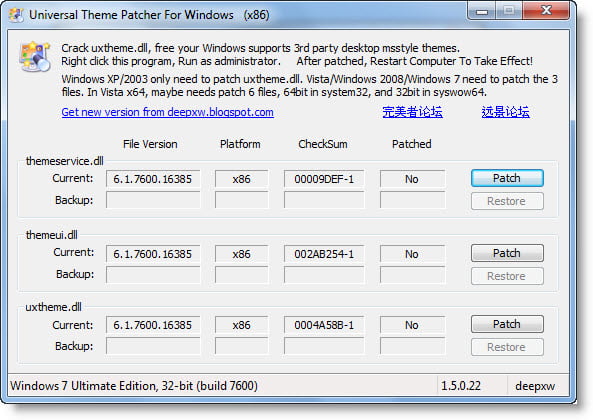
PatcherThemes.jpg

ajul, urgent ni!!
ajul aku baru je nak install pacther tu, tp sekerat jalan..
xde effect ape2 ke kat PC aku nnt???
dia suruh patch apa 3rd themes ntah..
kalau aku xmau guna, nnt boleh aku remove/uninstall balik x??
dia save kat mana dia pny file tu?? dah la aku blurr pasal bnda ni.. :">
tulun..tulun.. :D

biar aku tolong jawab, memang boleh restore balik, takde masalh, kalu ada problem ngan video, leh masuk ikut safemode dan restore balik :)cgrock
 
biar aku tolong jawab, memang boleh restore balik, takde masalh, kalu ada problem ngan video, leh masuk ikut safemode dan restore balik :)cgrock

mslhnya aku xpkai DeepFreeze dh, tu yg xberani nak install tak tentu hala :)
erk! mcm mana plak tu nk restore kat safe mode..
abd DDOS boleh ajar skit x?? :">
 
mslhnya aku xpkai DeepFreeze dh, tu yg xberani nak install tak tentu hala :)
erk! mcm mana plak tu nk restore kat safe mode..
abd DDOS boleh ajar skit x?? :">

lepas masuk safemode(F8) ko klik patcher tu, lepas tu ok...yes....akan ada 3 patch yg ko dah patch tadi, kat situ setiap satu ada button restore, jsut klik je restore setiap satu dan restart ikut normal mode...tadaaaa....(restore ikut safemode ni jika ada masalah ngan video display, kalu tade maslah blh je proceed restore ikut normal mode) :)cgrock
 
lepas masuk safemode(F8) ko klik patcher tu, lepas tu ok...yes....akan ada 3 patch yg ko dah patch tadi, kat situ setiap satu ada button restore, jsut klik je restore setiap satu dan restart ikut normal mode...tadaaaa....(restore ikut safemode ni jika ada masalah ngan video display, kalu tade maslah blh je proceed restore ikut normal mode) :)cgrock

ok ok! terima kasih byk2 la..
susah2 je.. :D
jap lagi cek cuba...
kalau jadi ape2 balik, cek tny balik kat sini yer :)
 
juz 4 my reccomendation,patch ur system first.then use Windows Theme Installer.At least u x need to manually install the theme...

And here's my result after install simple theme..u can take many theme at VirtualCustoms or SevenForum..

deskshot.png


and ni wife aku punyer...

deskshot2.png


deskshot1.png
 
Last edited:
waaaah!! cantik la bro.. memang sesuai utk perempuan...
boleh aku hadiah kat org tersyg aku :D


tanx!seminggu jg lah aku cr source untk completekan kitty ni.so,amcm ngan ko?dah dpt theme yg sesuai ker?

Slalunyer,Creator yg publishkn theme akn selitkn complete tools ngan theme dorg untk di download oleh user.4 me,untk customizekan theme,all u need is:

- Theme(frm VirtualCustoms/CreativeX/SevenForum)

- Start Orb Changer
Windows_7_Start_Button_Changer.png


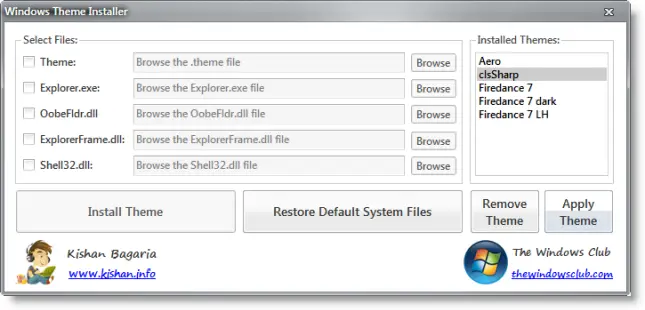
- Windows Theme Installer
windows-theme-installer.png


- Icon(yg sesuai untk theme)

- Patcher
themepatcher.jpg


Btw,ni link untk Hello Kitty.(u must register an account to download theme/tools)
 
Last edited:
tanx!seminggu jg lah aku cr source untk completekan kitty ni.so,amcm ngan ko?dah dpt theme yg sesuai ker?

Slalunyer,Creator yg publishkn theme akn selitkn complete tools ngan theme dorg untk di download oleh user.4 me,untk customizekan theme,all u need is:

- Theme(frm VirtualCustoms/CreativeX/SevenForum)

- Start Orb Changer
Windows_7_Start_Button_Changer.png


- Windows Theme Installer
windows-theme-installer.png


- Icon(yg sesuai untk theme)

- Patcher
themepatcher.jpg


Btw,ni link untk Hello Kitty.(u must register an account to download theme/tools)

ohh... trima kasih skli lagi atas info2 bro tu...
aku xdownload lagi.. cuma aku tak paham pasal patcher tu ler..
patcher tu file ape?? nnt bila dah download, apa akan jadi??
sbb themes windows ni aku jarang main sgt, takot efek benda lain. klu software cr@ck xpe la.. aku paham la patcher dia.. :)
 
yg aku tau,secara defaultnya ko x bleh install visual style/theme sblm patch ko punyer system.microsoft mmg ader sediakan themes,tp cuma windows sound/screensaver/theme colour jak yg berubah.so creator untk windows 7 theme tlh create patcher untk kita install theme yg blh customize hmpr sumer interface kat komp.sbnrnya ko blh install theme tanpa patcher,tp kene la install third party tools sprt windowblinds.klu guner patcher,u x need windowblinds or else,jus patch n u can use any theme bro.ko cumer perlu patch skali jak,n setau aku x lah smpi memudaratkn komp.ni thread yg prnh aku post dulu ttg cara nak guner patch tu:

http://www.carigold.com/portal/forums/showthread.php?t=119163
 
gud news bro,skrg ko x perlu sush patch ur system untk install theme.

Windows Themes Installer is a freeware portable utility which allows you to install a theme, remove a theme and restore defaults easily in Windows 7 & Vista.

UPDATE: 22.03.10. Windows Theme Installer has been updated to v 1.1. This new version will automatically patch the system files without the need of a 3rd party system file patcher.

Windows does not allow you to install 3rd party themes. You have to patch some system files to be able to do so. This new version 1.1 will automatically patch the system files without the need of a 3rd party system file patcher. If the system files are already patched then it does nothing. To restore the patched files you will need to use Universal Theme Patcher.

How to use Windows Themes Installer:

INSTALL A THEME AND CHANGE SYSTEM FILES:
1. Run the tool as Administrator.
2. Select the options which you want to install:
i) Theme
ii) Explorer.exe
iii) OobeFldr.dll
iv) ExplorerFrame.dll
v) Shell32.dll
3. Once you have selected the options, click on the “Browse” button and browse for the file of the desired option.
4. Now click on “Install Theme” button to install the theme and replace the system files.
RESTORE DEFAULT SYSTEM FILES:
To restore the default system files click on the “Restore Default System Files” button.
REMOVE A THEME:
To remove a theme select the theme which you want to remove from the list and click on the “Remove Theme” button.
APPLY A THEME:
To apply a theme select the theme which you want to apply from the list and click on the “Apply Theme” button.
It is always a good idea to create a system restore point first before making any changes to your system.


source:thewindowsclub
 
Back
Top
Log in Register