
srekcah
Fun Poster
- Messages
- 481
- Joined
- Dec 9, 2009
- Messages
- 481
- Reaction score
- 35
- Points
- 20
How to Install and Enable DreamScene in Windows 7
Windows DreamScene, a feature which allows a video clip, movie show, slideshow or animated image and picture to be set as the desktop background in Windows Vista has been removed in Windows 7, in favor of Desktop Slideshow wallpaper auto rotator. Although Windows 7 no longer supports DreamScane, the DreamScene function can still be manually added and installed into Windows 7 with a little hack in order to turn on and enable the DreamScene support in Windows7.
In order to enable DreamScene in Windows 7, the similar hack which allows DreamScene to be installed on non-Ultimate edition of Windows Vista:http://www.mydigitallife.info/2007/...remium-basic-starter-business-and-enterprise/ such as Windows Vista Home Basic, Home Premium, Business and Enterprise edition is used. The DreamScene installation hack has been compiled into an executable, which automatically copy the necessary DreamScene files and merge require registry keys and entries.
Tip: To run DreamScene in Windows 7, Windows Aero has to be turned on.
Download:http://depositfiles.com/files/5uzow74m4
Alternative:http://depositfiles.com/files/mk0dhj354 (Without Admin Rights Check)
How to Install DreamScene in Windows 7
Run the Windows7-DreamScene.exe as Administrator to install and enable Windows DreamScene on Windows 7. The installer will copy DreamScene.dll to %WinDir%\System32 folder, DreamScene.dll.mui to %WinDir%\System32\en-US folder and add the required registry keys and values. Then it will automatically restart the Explorer to make the installation of DreamScene works immediately.
A Windows DreamScene folder has also been created in %WinDir%\Web\ folder. You can place any video file that you want to set as DreamScene background wallpaper here as in Windows Vista, or anywhere you like. However, the folder is less useful as Windows 7 does not support direct viewing of video or animated media in Personalization Control Panel.
Windows 7 DreamScene Usage Guide
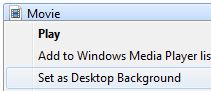
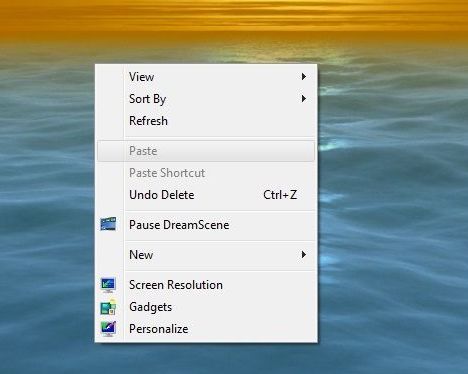
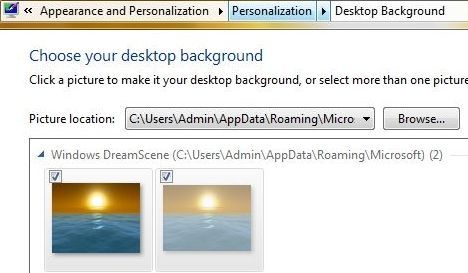
To apply a video clip (in .WMV or .MPG format) as the DreamScene animated wallpaper desktop background, right click on the video media file, and select Set as Desktop Background in the context menu. Due to DreamScene been stripped from Windows 7 issue, video files may not be visible inside Personalization and Desktop Background configuration page. However, all features of DreamScene, such as Play DreamScene, Pause DreamScene and sound/audio are supported.
Gud Luck!#:-S
Windows DreamScene, a feature which allows a video clip, movie show, slideshow or animated image and picture to be set as the desktop background in Windows Vista has been removed in Windows 7, in favor of Desktop Slideshow wallpaper auto rotator. Although Windows 7 no longer supports DreamScane, the DreamScene function can still be manually added and installed into Windows 7 with a little hack in order to turn on and enable the DreamScene support in Windows7.
In order to enable DreamScene in Windows 7, the similar hack which allows DreamScene to be installed on non-Ultimate edition of Windows Vista:http://www.mydigitallife.info/2007/...remium-basic-starter-business-and-enterprise/ such as Windows Vista Home Basic, Home Premium, Business and Enterprise edition is used. The DreamScene installation hack has been compiled into an executable, which automatically copy the necessary DreamScene files and merge require registry keys and entries.
Tip: To run DreamScene in Windows 7, Windows Aero has to be turned on.
Download:http://depositfiles.com/files/5uzow74m4
Alternative:http://depositfiles.com/files/mk0dhj354 (Without Admin Rights Check)
How to Install DreamScene in Windows 7
Run the Windows7-DreamScene.exe as Administrator to install and enable Windows DreamScene on Windows 7. The installer will copy DreamScene.dll to %WinDir%\System32 folder, DreamScene.dll.mui to %WinDir%\System32\en-US folder and add the required registry keys and values. Then it will automatically restart the Explorer to make the installation of DreamScene works immediately.
A Windows DreamScene folder has also been created in %WinDir%\Web\ folder. You can place any video file that you want to set as DreamScene background wallpaper here as in Windows Vista, or anywhere you like. However, the folder is less useful as Windows 7 does not support direct viewing of video or animated media in Personalization Control Panel.
Windows 7 DreamScene Usage Guide
To apply a video clip (in .WMV or .MPG format) as the DreamScene animated wallpaper desktop background, right click on the video media file, and select Set as Desktop Background in the context menu. Due to DreamScene been stripped from Windows 7 issue, video files may not be visible inside Personalization and Desktop Background configuration page. However, all features of DreamScene, such as Play DreamScene, Pause DreamScene and sound/audio are supported.
Gud Luck!#:-S


