BTC USD 86,268.9 Gold USD 4,184.62
Time now: Jun 1, 12:00 AM

Info:Windows 7 tips, tricks and secrets

nice bro.tanx 4 make some Malay 1.btw,where did u take this frm?looks like Indonesian word there.

Just use google translate from english version daa.. :D so that the best G can translate in malay..


p/s tu pasal post 2 version..:D:D:)cgrock
 
Tetapi W7-64bit ada masalah dalaman kalau kita menggunakan microsoft outlook 2010. Program yg kita guna akan menjadi 'sedikit' perlahan.
Ini adalah pengalaman aku la...yang lain2 semua best...
laptop aku pakai acer 4810T...Bateri boleh guna sampai 8jam..
Prosesor core2 dou solo 9400..:)
 
Tetapi W7-64bit ada masalah dalaman kalau kita menggunakan microsoft outlook 2010. Program yg kita guna akan menjadi 'sedikit' perlahan.
Ini adalah pengalaman aku la...yang lain2 semua best...
laptop aku pakai acer 4810T...Bateri boleh guna sampai 8jam..
Prosesor core2 dou solo 9400..:)

pakai win7 nie kat laptop..
bateri jimat skit ek ? :-? :-?
 
tapi aku rse win7 ngan win vista nie x lari banyak beze die ..
 
Retrieve, View or Display Wireless (WEP or WPA WiFi) Network Security Key or Password

Windows 7, like its predecessors, remembers and saves (on user consent) the network security key or password on first connection to a secured wireless (WiFi) network which is protected by WEP, WPA or WPA2, so that Windows 7 can automatically authenticate, sign in and connect to the Internet through the wireless access point or WiFi hotspot on every system startup.

For many reason, end users may want to retrieve or view the WEP, WPA or WPA2 protected wireless network security key. For example, lost or forgotten administrator password making it impossible to view the serial key on the Wi-Fi wireless gateway or router, or need to setup new computer to access the Internet through same wireless network adapter or Wi-Fi hotspot.

The quickest way to get the network security key for an existing wireless connection, of course, is from the PC or computer which is currently connected to the wireless network. Although the network security key is saved and stored in local Windows computer, Windows OS does not provide an easy way to retrieve, view or display the network security key or password on screen, in plain text and not hidden as asterisk, until Windows 7.

How to Recover, Retrieve, Show or Display Network Security Key for WEP, WPA or WPA2 Protected Secure Wireless Network in Windows 7:

1. Go to Control Panel -> Network and Internet -> Network and Sharing Center.

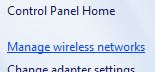
2. Click on Manage wireless networks on the left panel.

manage-wireless-network.JPG


3. A list of wireless networks that the PC used to connect to with saved password or security key. Click to highlight on a wireless network connection that user wants to view its network security key, and the right click on it and select Properties.

wireless-network-properties.JPG


4. Click on Security tab.

5.The network security key for the wireless network is hidden by asterisk by default. Instead of using utilities to reveal, display or show original characters of password or key hidden behind asterisks, click on Show characters button to reveal and display the actual original network security key on screen.

wireless-network-security-key.JPG


p/s 4 own wifi....
 
7 differences between Windows 7 and Vista.

1. Multi-touch in Win 7

With touch technology becoming the latest trend after Apple’s revolutionary multi-touch iPhone, Windows 7 has multi-touch for all the supported hardware. HP Touchsmart series is one of them.

2. Aero Peek

Aero Peek allows Win 7 users to instantly make all the opened windows transparent. So let say, you want to see the weather on Windows 7 sidebar Gadget, this will be very useful.
3. New Taskbar

Windows 7 desktop will look different now because of the new taskbar. You can now reorder the opened Window buttons. It has Jump Lists feature which will allow you to access common programs very easily. And you can see the full screen preview before switching to a window.

win7-taskbar.jpg


As you can see above, Quick Launch bar and taskbar are merged together in Windows 7.

4. Games

Along with old Windows Vista games, Win 7 will have online version of Checkers, Spades and Backgammon. If you remember, recently there was a new robot game Tinker on Vista. This was a part of Vista Ultimate.
5. Media Center

Win 7 comes with enhanced Media Center experience. It will have Internet TV which will telecast MSN channels by default and will have a desktop sidebar gadget for the same too.
6. NetBook Edition

Netbooks are the light weight portable laptops used for browsing, email etc. It seems that by this year end we’ll see Netbooks by every major Brand like HP, Dell, Sony etc. Windows 7, apart from Ultimate Edition and Business edition will also have Netbook Edition. Though, of course it’ll be a stripped down version.
7. Performance and User Friendliness

Windows 7 will tremendously reduce the time to install an app. Also, now Windows will be less annoying with very less UAC prompt. For developers also, Win7 will reduce the time taken for developing Windows app.#:-S
 
Hack to Activate and Switch Window in Windows 7 By Mouse Over Hover Without Click

When there are many windows open on desktop
of Windows 7, normally users will click on another window in order activate the window into front or foreground and switch to the task or window. Some users may prefer to be able to switch to another window immediately upon mouse over or hover the mouse pointer on the inactive window. Microsoft provides such auto-bring to front window on mouse over option in Windows 7.

To enable and turn on Windows 7 feature to activate and bring to front a window automatically on mouse over as if user has click on it without any actual mouse click, follow these steps:


1. Go to Control Panel.

2. Click on Ease of Access link or Ease of Access Center icon.

3. Select Change how your mouse works or Make the mouse easier to use option.

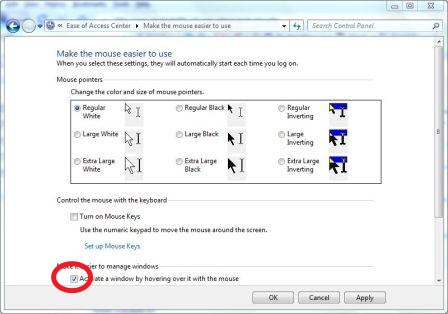
4. Tick the check box for Activate a window by hovering over it with the mouse under “Make it easier to manage windows” section.

activate-window-hover-mouse.jpg


5. Click OK or Apply, and hover your mouse on another window to activate it instantly.


Gud Luck!#:-S
 
Back
Top
Log in Register