BTC USD 81,813.4 Gold USD 4,378.12
Time now: Jun 1, 12:00 AM

Buat link pada .swf

bukan ke masa kita create flash tu dah ada option utk add hyperlink, jadi masa kamu create flash banner tu add saja hyperlink yg kamu nak.

boleh tahu kamu guna software apa utk create flash banner ni?
 
bukan ke masa kita create flash tu dah ada option utk add hyperlink, jadi masa kamu create flash banner tu add saja hyperlink yg kamu nak.

boleh tahu kamu guna software apa utk create flash banner ni?

pakai Macromedia Flash MX
 
pakai Macromedia Flash MX

try cara ni, ada jumpa kat google

firstly, make a big rectangle over the WHOLE project, on the top layer, then make that into a button (F8), then turn the alpha of the button to 0%, then in the actions do make it a link to the url u want.
 
nie try tgk LINK
ideanya sama macam kat atas
overide satu lagi layer utk button
 
ni ada tutorial lengkap bagi sesapa yg nak belajar dari basic

Creating a Hyperlink:
The following steps will guide you in creating a hyperlink:

1. Create a new document in Flash MX by going to File | New. A new, blank Flash MX movie will be displayed.

2. From the Tools panel, click the Oval Tool and draw a circle in your drawing area. Once the circle has been drawn, select the circle with your mouse pointer.

hyperl1.gif


[ circle after having been selected ]

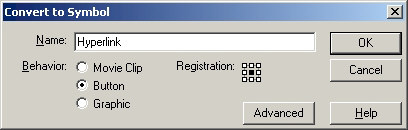
3. Once the circle has been selected, press F8 or go to Insert | Convert to Symbol. The Convert to Symbol dialog box appears. In the Name field, give this circle a name. I will call this circle "Hyperlink". In the Behavior section, select the Button option. Your Convert to Symbol dialog box should look like the following image:

convertosymbo.jpg

[ circle after having been selected ]

4. Press OK to close the Convert to Symbol dialog box. The circle is now a button. Right click on the circle and select Actions. The Actions panel will expand for you to input actions.

5. From the Actions panel, click on the plus symbol ( + ) found near the middle of the panel. Once you click the plus symbol, go to Actions | Browser/Network | getURL.

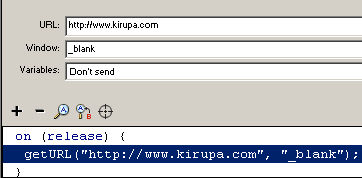
6. You will see the URL, Window, and Variables field displayed in your Actions panel. In the URL field enter: http://www.kirupa.com. Click the Window field/drop-down menu and select _blank. Your Actions panel will look like the following image:

hyperl2.gif

[ the action panel after filling in the fields ]

7. Save the file and preview the animation in your browser by going to File | Publish Preview | HTML. Click on the button, and you will see a new browser window open.

Window States
You may have noticed, that when the button was clicked, it opened a page in a new window. Sometimes you may not want every link to open in a new window. Maybe you want the link to open in the current window. That is where the Window field of the button Actions plays a large role.

In this tutorial, you clicked the Window drop-down menu/field and picked _blank from one of four choices. To make it easier for you understand the Window states, I have provided a brief explanation about each selection in Window drop-down menu:

* _self
Loads the link in the current page or the current page in a Frame. This is the default selection used by Flash to open any link.

* _blank
Loads the link in a separate browser window. You selected _blank in the tutorial above.

* _parent
Loads the link into the frameset file of a frame. The frameset file controls all the frames, and setting the window to _parent will eliminate frames in the subsequent links. As you may have seen, often times, links get loaded inside frames unintentionally. Setting _parent will solve the misuse of frames!

* _top
Loads the link on the top frame.

source:
http://www.flashperfection.com/tutorials/Creating-a-Hyperlink-Flash-MX--81646.html
 

website Under Review

You see this page, because the system administrator of 000webhost.com is currently checking this website for malicious content. This redirect will be removed once we will finish manually checking all files on this account. As far we check over 100 websites, it can take about 2-4 hours to complete. If you are the owner of this website, you will get email confirmation once it's done. If you are a visitor - please come back later.

www.000webhost.com is a free web hosting provider and all free hosting providers suffer from abusers. Around 5% of users signup here just to start hacking or phishing website or make other damage. So, in order to survive, we must monitor what our users are hosting.

We are sorry for any inconveniences, but checking all content manually, it is the only way to provide you with the most secure and reliable service. If you have found any illegal website on our network, you can report it here.
 
website Under Review

You see this page, because the system administrator of 000webhost.com is currently checking this website for malicious content. This redirect will be removed once we will finish manually checking all files on this account. As far we check over 100 websites, it can take about 2-4 hours to complete. If you are the owner of this website, you will get email confirmation once it's done. If you are a visitor - please come back later.

www.000webhost.com is a free web hosting provider and all free hosting providers suffer from abusers. Around 5% of users signup here just to start hacking or phishing website or make other damage. So, in order to survive, we must monitor what our users are hosting.

We are sorry for any inconveniences, but checking all content manually, it is the only way to provide you with the most secure and reliable service. If you have found any illegal website on our network, you can report it here.

aik!! nape naza? tak bleh view ke?
 
Back
Top
Log in Register