BTC USD 81,277.7 Gold USD 4,378.12
Time now: Jun 1, 12:00 AM

Top 10 Excel Formulas Interview Questions & Answers (2022)

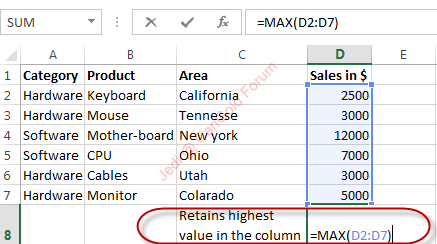
7) MAX Formula: =Max(D2:D7)

This excel formula will retain the cells that have the highest value in the column, for example, here we want to know the highest value for computer items, and it retains the value $12000. Likewise, you can execute same formula to get a minimum value, in the formula you have to replace Max with Min.
max_formula_1.png
 
8) Factorial Formula= FACT(number)


Factorial formula will return the factorial of the number. To know the factorial number for 3, we use this formula. You can use this formula to know the probability for any number, here we will have factor 3=3x2x1.

factorial_formula_1.png


factorial_formula_2.png


Factorial Formula
 
9) VLookup Formula = Vlookup(value, range, and get me value in the column, is my list sorted)

VLookup formula is used when you know anyone detail of any object or person and, you retain other formation based on that detail. For example here we have an example of the keyboard, where you know the retail price of the keyboard but you don’t know how much total sale it made in California by selling keyboard. To know that you will use =Vlookup(20,D2:D7,2,False). This formula will give you the total sale amount based on the retail price. While applying this formula you have ensure that whatever you are placing as ref, must be unique, for example you are looking for any particular employee with its ID number it should not be allotted to others otherwise it will show an error.

vlookup_formula_1.png
 
10) IF function formula: IF (E2>2000, correct/Incorrect)


Here we have used IF function; this function is used when you want to refer whether the following condition met is correct or incorrect. Here we have used “good” as any sales made greater than 2000 should be remarked as good. Likewise, you can set this as “bad”, “correct” or “incorrect”.

if_function_formula_1.png
 
Back
Top
Log in Register