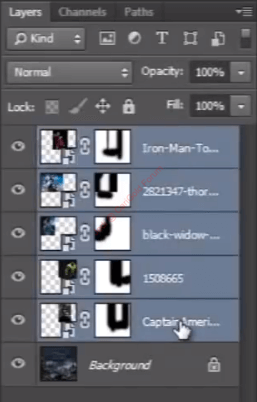
Feb 1, 2022 #11 soybean CG Hardcore Club Messages 63,243 Paid Membership Silver Medal Joined Feb 15, 2009 Messages 63,243 Reaction score 4,135 Points 661 Silver Medal Once you have done with it, then select all five images and press CTRL + G to put them all in a single group.
Once you have done with it, then select all five images and press CTRL + G to put them all in a single group.
Feb 1, 2022 #12 soybean CG Hardcore Club Messages 63,243 Paid Membership Silver Medal Joined Feb 15, 2009 Messages 63,243 Reaction score 4,135 Points 661 Silver Medal And change the blend mode of that group to “screen” and look it is nicely blended with the sky.
Feb 1, 2022 #13 soybean CG Hardcore Club Messages 63,243 Paid Membership Silver Medal Joined Feb 15, 2009 Messages 63,243 Reaction score 4,135 Points 661 Silver Medal Then make the image more effective with the help of “curve”.
Feb 1, 2022 #14 soybean CG Hardcore Club Messages 63,243 Paid Membership Silver Medal Joined Feb 15, 2009 Messages 63,243 Reaction score 4,135 Points 661 Silver Medal Now we need to give a title to this poster. i have one image that we can use in this poster.
Feb 1, 2022 #15 soybean CG Hardcore Club Messages 63,243 Paid Membership Silver Medal Joined Feb 15, 2009 Messages 63,243 Reaction score 4,135 Points 661 Silver Medal Scale and arrange the position of the image.
Feb 1, 2022 #16 soybean CG Hardcore Club Messages 63,243 Paid Membership Silver Medal Joined Feb 15, 2009 Messages 63,243 Reaction score 4,135 Points 661 Silver Medal Now take a layer mask for this image. and start painting with black color and smooth round brush on unwanted parts of the image.
Now take a layer mask for this image. and start painting with black color and smooth round brush on unwanted parts of the image.
Feb 1, 2022 #17 soybean CG Hardcore Club Messages 63,243 Paid Membership Silver Medal Joined Feb 15, 2009 Messages 63,243 Reaction score 4,135 Points 661 Silver Medal Remove that all black color around the name.
Feb 1, 2022 #18 soybean CG Hardcore Club Messages 63,243 Paid Membership Silver Medal Joined Feb 15, 2009 Messages 63,243 Reaction score 4,135 Points 661 Silver Medal And then change the blending mode to “linear dodge”.
Feb 1, 2022 #19 soybean CG Hardcore Club Messages 63,243 Paid Membership Silver Medal Joined Feb 15, 2009 Messages 63,243 Reaction score 4,135 Points 661 Silver Medal Drag it down below the curve layer. Now save the file and take a look of it.
Feb 1, 2022 #20 soybean CG Hardcore Club Messages 63,243 Paid Membership Silver Medal Joined Feb 15, 2009 Messages 63,243 Reaction score 4,135 Points 661 Silver Medal Its looks awesome.