BTC USD 84,525.1 Gold USD 4,278.79
Time now: Jun 1, 12:00 AM

All PC Software/Applications Collection by matxada

T-Splines for Aut0desk Maya and Rhinoceros (2010)

T-Splines for Aut0desk Maya and Rhinoceros (2010)

untitled-14.jpg

T-Splines for Aut0desk Maya and Rhinoceros (2010) | 250 MB

T-Spline - a new modeling technique, an alternative to NURBS and subdivision surfaces. NURBS and subdivision surfaces together are one of the cases of T-splines. This enables the T-Spline adopt all the positive aspects NURBS and Subdivision, and simultaneously remove the majority of their weaknesses. T-spline is a kind of symbiosis between NURBS and Subdivision modeling. It becomes possible to interactively switch between the methods of modeling NURBS / T-spline / Subdivision.

Year: 2010
Versions for Rhinoceros: 1.2, 1.3, 1.4.1, 2.0 Final, 2.1 Final, 2.2 Final, 2.3 r6068
Printable Maya: 1.6c
Developer: T-Splines, Inc.
Platform: Windows
Language: English only
Medicine: Present

Features:
* T-spline offers - accuracy, speed of work, and complete freedom for creativity;
* T-spline allows designers to more quickly create complex surfaces and manipulate with ease, reducing the simulation time by 20-30 percent;
* Full compatibility and conversion with no loss of T-spline surfaces to NURBS surface and back. It is also possible to convert a polygonal model in T-Spline;
* T-Spline uses 75 percent less control points than NURBS and simplifies the grid model, retaining all the details and smooth surfaces;
* T-spline combines valuable opportunities, all modeling techniques, which were previously only available separately;
* T-spline surfaces can be applied in industrial production


download.jpg


Code:
http://hotfile.com/dl/45743359/39cf09b/ThienBao_T-Splines.part1.rar.html
http://hotfile.com/dl/45744191/ecae34c/ThienBao_T-Splines.part2.rar.html
http://hotfile.com/dl/45746854/7ca016e/ThienBao_T-Splines.part3.rar.html
 
Portable Adobe Photoshop CS5 x32 pre-release

Portable Adobe Photoshop CS5 x32 pre-release

untitled-7.jpg

Portable Adobe Photoshop CS5 x32 pre-release | 122MB


With the advent of Photoshop CS5 photographers have access to a function of the new generation to create images with high dynamic range (HDR). Combining pictures with different exposures in one HDR-image, Photoshop CS5 accurately retains the full range of key scenes. New technology allows the HDR Pro to eliminate spurious distortions and provides more precise control of the tone mapping. With features HDR rendering, users can simulate HDR-images using a single image, claim the developers.


In addition, Photoshop CS5 includes revolutionary tools to enhance the creative potential of users. Brand new drawing tools include a tool Mixer Brush, who mixes an infinite number of colors on one brush tool Bristle Tips, creating the effect of this smear brush. With Puppet Warp tool, users can change the position or view of any element of the image, for example, straightened his bent arm on the photos or adjust an image of the landscape to create a new spatial perspective.

OS: Windows XP, Vista, 7
Language: English
The medicine: not required
Size: 122.75 MB

download.jpg


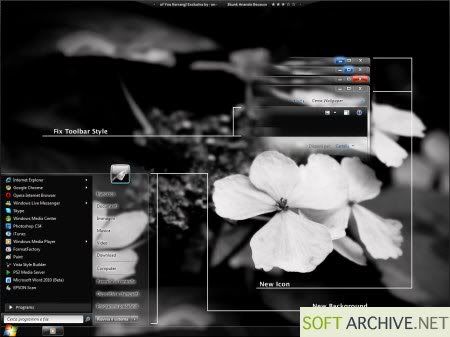
12 Windows7 Crystal Themes

12 Windows7 Crystal Themes

381682.jpg

12 Windows7 Crystal Themes | 176 MB

Themes Included in the Collection:
1. Acrylic7
2. Adiemus Project Final
3. Angelwing
4. BattleField Bad Company 2
5. Elegant Glass V2
6. Green Blue Wicker
7. Mac7 Update
8. My Theme For Windows7
9. Night City
10. OutThere
11. StarTrek
12. Ubuntu7 ThemesPack

download.jpg


Code:
 http://hotfile.com/dl/40976419/4eae9b4/Win7Themes.rar.html
 
Download 1000 Gadgets for Windows 7Vista

Download 1000 Gadgets for Windows 7Vista

1273276971.jpg


Mega-assembly of 1000 of useful gadgets for your Windows 7/Vista.
Additional Information:

900 gadgets necessary to establish a 100 gadgets Gadgets folder to extract to the folder C: Program FilesWindows Sidebar. On the replacement of files / folders to agree.

Developer: Microsoft
Year: 2009
Platform / OS: Windows Vista / 7 (x64/x86)
Compatibility with Vista: complete
Interface Language: English, Russian
Enabling | reg code: not required
File size: 217 MB

download.jpg


Code:
http://hotfile.com/dl/41893777/bfb6b9c/Now4ever.VN__1000_gadjets.rar.html
 
Browsers and Plugins Collection (2010)

Browsers and Plugins Collection (2010)

2u90qba.jpg


Browsers and Plugins Collection (2010) | 170.69 MB

What you need is just an internet connection. Rest is here for browsing the whole world, playing flash games online or watching movies on YouTube.

Contents:
Adobe Air 1.5.3.9130
Avant Browser 11.7 Build 46
Firefox 3.6
Flash Player 10.0.45.2 (IE)
Flash Player 10.0.45.2 (Non IE)
Flock 2.5.6
Google Chrome 5.0.317.2 Beta
Google Toolbar 6.4.1321.1732 (IE)
Google Toolbar 7.0.2009.1216b (Firefox)
Google Web Accelerator 0.2.70
Internet Explorer 8.0 (Vista)
Internet Explorer 8.0 (XP)
K Meleon 1.5.3
Maxthon 2.5.12.4200 Beta
Netscape 9.0.0.6
Opera 10.50 Beta 1 (Build 3247)
Safari 4.0.4
SeaMonkey 2.0.2
Shockwave Player 11.5.6.606
Silverlight 3.0.50106

download.jpg


Code:
http://hotfile.com/dl/43285078/950caad/Vinaleech.com_WZ_BAP2K10.rar.001.html
http://hotfile.com/dl/43285699/df5d200/Vinaleech.com_WZ_BAP2K10.rar.002.html
 
PowerDVD 10 Ultra 3D v10.0.1705.51 Pre-Activated Multilingual-ADHDerby

PowerDVD 10 Ultra 3D v10.0.1705.51 Pre-Activated Multilingual-ADHDerby

2u90qba.jpg

PowerDVD 10 Ultra 3D v10.0.1705.51 Pre-Activated Multilingual-ADHDerby | 113 MB

PowerDVD is the consumer’s favorite Blu-ray / DVD playback software, complemented by high-definition Dolby and DTS audio technologies. PowerDVD now converts 2D movies into 3D, plays an extensive range of video formats including MKV, FLV, 3GP, and makes movies social by sharing bookmark reviews and live comments. Experience PowerDVD - the best Blu-ray playback and DVD player software available today.

Supported formats for Blu-ray & DVD playback:
• Supports the latest video formats: MKV, FLV, 3GP, AVCHD and AVCREC
• Supports the latest audio formats: Dolby; TrueHD, Digtial EX, Plus, DTS-HD
• Transform 2D into 3D
• Compatible with Windows 7

Languages: English, Chinese Traditional, Japanese, Spanish, Korean, Chinese Simplified, German, French, Italian

Preactivated Recompressed Setup:
• Installs the Ultra 3D Version, pre-activated and pre-registered
• Doesn't install the Google Toolbar & Cyberlink's RichVideo Service
• The MoovieLive and Movie Remix features are disabled by default
• Sets the cursor hide time in Full Screen to 1 second (default = 3)

Changelog build 1705 (2010-05-14):
Issues resolved:
• CyberLink PowerDVD does not hide the navigation bar during DVD folder playback from the hard drive.
• CyberLink PowerDVD cannot enter full screen mode during DVD folder playback from the hard drive.
• CyberLink PowerDVD cannot play back .IFO files in DVD folders on the hard drive.
• CyberLink PowerDVD cannot play back .TS files normally.
• CyberLink PowerDVD does not display normally in the Windows Classic mode of Windows 7.

======================================================================================================================

Note about virus warnings: If you get a trojan or virus warning then it's a false positive! - I've added nothing!!
You get exactly the same warning when you download and install the retial version because it's the same setup.
I only removed and modified some files to disable MoovieLive, Movie Remix and RichVideo and to make it pre-activated!

Here's how to check the Digital Signatures:
• Extract Setup.exe with 7-zip and open the directory where you extracted the files
• Right click on an exe file, select properties and click on the Digital Signatures tab
• Double click on the Signature and read the line below "Digital Signature Information"
• If it says that the Digital Signature is OK, it means that the file isn't altered!
• Click on the "View Certificate" button for more information

======================================================================================================================

Install: Just run Setup.exe and you are done, it's registered and activated.

============
:: EXTRAS ::
============

Tweak Pack for PowerDVD 10
Blu-Ray_Region_Reset.bat: Resets the Blu-Ray region settings (remaining changes)
Disable_BD_Mouse_Pop-up.bat: Disables the Blu-Ray disk Mouse support Pop-up [NEW]
Enable/Disable_MoovieLive.bat: Enables/Disables MoovieLive and Movie Remix
Enable/Disable_CinemaMode.bat: Enables/Disables the Cinema Mode
Reset_HD_Dailog.bat: Resets the High-Definition Content dialog *
Remove/Restore_StartupApps.bat: Removes/Restores the Startup Applications **
Reset_Visualization.bat: Resets the Visualisation settings to default ***
Enable/Disable_Toolbar.bat: Enables/Disables the PowerDVD Toolbar (Mini Player Mode)

This comes in handy if you selected "Don't ask me this question again" and want to re-enable
or disable TrueTheater Lightning and Smart De-interlace when playing High-Definition content.
Enables/Disables BDRegion and RemoteControl10 from running at startup.
Don't disable them if you're planning to use a remote to control PowerDVD!!
Run this one if you selected a visualisation that crashes PowerDVD


Installation Info
For PowerDVD 9: UnRAR and Run SetUp.exe.
For Tweak Pack: Read Tweak Pack Readme.txt (follow it exactly).

download.jpg


Code:
http://hotfile.com/dl/43287095/42eb55d/Vinaleech.com_PwrDVD10Ultra3D10.0.1705.51.rar.html
 
Topaz Photoshop Plugins Bundle (08/06/2010)

Topaz Photoshop Plugins Bundle (08/06/2010)

j7cht3.jpg

Topaz Photoshop Plugins Bundle (08/06/2010) | 182 MB

Topaz Detail - plug-in for Adobe Photoshop to create the HDR-images without the occurrence of luminous halos. Also, using Topaz Detail, you can increase or decrease the sharpness of the image, convert images to greyscale with full control of tonal range. The essence of the plugin is as follows: Topaz Detail share photos on the three types of parts - small parts, medium and large items - and gives full control over every type. This gives unlimited possibilities for beginners and professional photographers, who will be able to achieve high quality and sharpness of the image with just one plug.

Collection of Plugins for Adobe Photoshop Topaz 7 in 1 Update 08/06/2010.

The bundle contains:
Topaz Detail v2.0.4
Topaz DeNoise v4.1.0
Topaz Simplify v3.0.1
Topaz ReMask v2.0.4
Topaz Adjust v4.0.3
Topaz DeJPEG 4.0.1
Topaz Clean v3.0.1

Options Topaz Detail:
• Full control of small, medium and large parts
• Obtain clean sharp images without any artifacts
• Quickly create black and white photos with the option toning
• Using the built-in presets for quick results
• Compatible with 64-bit Photoshop CS4, Lightroom, Aperture and iPhoto
• New interface, more convenient to use
• And many other possibilities

Topaz DeNoise - plug-in for removing noise in photos in Adobe Photoshop. The plugin uses the latest technology of high-quality noise reduction in digital photos while preserving as much image detail. In Topaz DeNoise 3, an entirely new approach to noise reduction, which is different from any other methods to date. Unlike other similar programs, in which the blurred image details, DeNoise analyzes the entire image processing, and therefore eliminates the noise while preserving the conservation of important image detail.

Options Topaz DeNoise:
• Removing noise in photos with maximum preservation of detail
• saves underexposed images by removing excessive noise
• Save the image details untouched and clear
• Restore the detail photos, which were blacked out by noise
• Using the built-in presets for quick results

Topaz Simplify - plug-in for Adobe Photoshop to create masterpieces of art from any of the pictures. With Topaz Simplify, you can create stunning images with simulated oil paints, watercolors, pencil and burning wood. To achieve results quickly, you can use ready-made presets. Using their own settings and adjustments you can save them in your own presets to use them in the next image. In addition, using Topaz Simplify, you can create thumbnails of your images with simulated drawing pencil. Plug-in opens up many new opportunities for photographers and digital artists.

Features Topaz Simplify:
• Instantly convert your photos into an exciting art
• Control of the artistic process with an infinitely configurable options
• Use simple, fast and easy to master with sliders
• Using the built-in presets to achieve results quickly
• Save your settings in your own presets
• Take advantage of multiple processors for faster processing
• Use Photoshop smart filter for convenient and non-destructive editing
• Full compatibility with 64-bit versions of Adobe Photoshop CS4

Topaz ReMask - great plugin for Adobe Photoshop, allows you to quickly and easily distinguish objects from background images. Separated thus the object can be used as a separate layer for smooth integration with other images. The plugin uses a unique technology of the new generation, which allows the automatic mode most accurately cut the object and apply it to another picture. All it takes is a few minutes to highlight the desired object of special brushes plug: green brush, you must select the area that should remain unchanged; blue tassel, you should circle the contours of the object for processing plug on which the software automatically separates the object from the background, a red brush you excrete the background of your image itself. The technology used in the program is very accurate and can cope with complex parts photos, such as shadows, transparency, small parts, hair, leaves, etc.

New in Topaz ReMask 2:
• Significantly improved algorithms for masking a more detailed treatment of hair and other small parts
• Saving results in a separate layer mask if you have included at least one
• Simple cut the background image, if you do not want to use a layer mask
• Four types of display all aspects of your mask
• Undo and redo
• New support for using keyboard shortcuts
• Significantly improved control of memory
• Support for Adobe Photoshop CS4

Topaz Adjust - plug-in Adobe Photoshop for processing digital images. This plugin easily allows you to control many aspects of digital photography, including color, detail, exposure, blur, brightness, contrast, noise reduction and much more. For maximum convenience, is an automated intelligent exposure correction, noise removal tool, allows you to save settings in the presets for future use, using only one exposure, you can create close as possible to the HDR image. Topaz Adjust 4 has a new more user-friendly interface, a new panel presets, new window to preview images in a specified format, etc.

Options Topaz Adjust 4:
• Customizable Interface Removable panels
• Improved noise reduction tool
• Intelligent improved image detail
• Unique color effects in advanced color processing
• Preview each preset in real time
• Using hotkeys
• Multiple built-in presets and the ability to create their
• Support for Adobe Photoshop from the 7th to the CS4 version

Topaz DeJPEG - plug-in for removing artifacts of JPEG images and increase their sharpness in Adobe Photoshop. Many people know little squares and the vagueness of compressed JPEG images. Plug-in for Adobe Photoshop Topaz DeJPEG help you clean up the squares and improve image clarity. The program is very easy to use thanks to the fact that the plugin uses advanced algorithms that always reach the optimal result. As always, for rapid manipulation of photos, you can use the built-in presets from Topaz Labs.

The main functions DeJPEG:
• Significant improvement of the quality of JPEG images
• Preservation and improvement of parts JPEG photos
• Removal of artifacts after JPEG compression
• Restoring the image information from damaged JPEG files to
• Easy and intuitive working environment
• Using the built-in presets for quick results


download.jpg


Code:
http://hotfile.com/dl/47623715/1c2a645/tpzplginsbundl06062010.part1.rar.html
http://hotfile.com/dl/47629424/298a447/tpzplginsbundl06062010.part2.rar.html
 
FatLoud Heat Synths Wav And Rex

FatLoud Heat Synths Wav And Rex

fatloud_Urban_Synths.jpg

FatLoud Heat Synths Wav And Rex
size:98 MB

Heat Synths" featuring 40 radio ready synth loops, suitable for producers working in genres like hip hop, r&b, crunk and other urban music related styles. Every loop was custom programmed, carefully mixed & mastered to deliver you best possible sound quality and instant inspiration for creating your own beats.
Each pack in MICRO SERIES contain 40-60 multiformat loops, hits or stabs in incredible low price! If you do not like to spend your money on "hundreds of sounds" librarys and use only few loops/hits after purchase.. this series is for you! Packs in MICRO SERIES are small, but still hi FatLoud quality & no fillers included!


17a848c0download.jpg


Code:
http://hotfile.com/dl/52820542/27354c3/ThienBao_891986F.L.H.S.rar.html
 
MAGIX Movie Edit Pro 16 Plus 9.0.1.60 (C2)

MAGIX Movie Edit Pro 16 Plus 9.0.1.60 (C2)

8d231ea22gex0.jpg

MAGIX Movie Edit Pro 16 Plus 9.0.1.60 (C2) | 276 Mb

MAGIX Movie Edit Pro unites highly precise video editing tools with advanced surround dubbing and individually adjustable special effects!A choice of edit screen modes and professional, yet easy-to-use features make it a snap for anyone to transform raw video footage into impressive movies. Make sensational cuts, build special effects and 3D transitions and create your own soundtracks. An integrated CD & DVD authoring utility makes it easy to create animated chapter menus, like those seen on DVD videos, and record your memories onto CD & DVD.

Enjoy the groundbreaking Windows Media High Definition technology and use the high image resolution of your PC monitor, projector, or HD-enabled TV device (via compatible-DVD player) to play crystal clear photoshows. The new standard format lets you experience the full multi-megapixel resolution with almost no loss and guarantees sharp contours, vibrant colors and great depth of focus.

All you need is a few clicks to burn your movies with high-resolution menus onto CD or DVD: autostart-enabled for any PC! Simply choose between two high definition standard resolutions: 1280x720 and 1920x1080. For comparison: The PAL NTSC norm, for American TVs, can only handle 640x480 pixels.

Turn your friends into pirates at the touch of a button with an eye patch, or transform children into little angels with their very own haloes. Enhance romantic memories by adding fireworks, or have it rain hearts. You can even make the family dog talk through comical speech bubbles.

Refine your videos with funny gags at the touch of a button using animated fun motifs and high-quality decoration/text elements incl. sound, fitting comments and impressive effects, individually adaptable (position, size, rotation, etc.), and fun for everyone.

Give us your best shot, and upload it to your own free photo & video website. Whether from your camcorder, digital photo camera or mobile phone, you can now import everything that moves you and easily put it online in a snap. Output your movies in the right resolution for the internet and, if requested, in HDTV quality!

Surprise your friends and family with your video messages, impress them with holiday footage or give your far-away loved ones something to smile about. There's no limits to your imagination: All videos are automatically posted online at the desired bandwidth, complete with effects, text, speech commentary, and background music, and can be viewed with a simple click.

Precise sorting and quick redesigning of whole scene processes with adjustable zoom in the new scene overview, integrated directly into the Arranger, you'll always see what's going on, even in large scale projects.

Time-consuming navigation and tedious searching through large projects is finally a thing of the past. Switch from the fullscreen overview to the simple storyboard or detailed timeline views with a simple click. This way you'll always have the perfect overview to stay in control.

You want to perfectly synchronize your New Years fireworks' video with the sound of the firecrackers? Or to precisely tag certain on-screen moments with text. Or to change to the next scene directly after the drum roll? And all this, without having to edit anything? Then simply set a snap point at the desired positions in your video or sound file. You can now "magnetically" dock any video, audio or text objects you want and play them back synchronously.

Here are some key features of "MAGIX Movie Edit Pro":

· Fantastic 3D power effects
· Burns high-definition discs with menu
· Add humorous touch to scenes
· Free photo & video websites with a click
· Double-layer DVD burning
· Intelligent burn assistant for the appropriate disc type
· MAGIX Smart Design for easy and intuitive use
· Integrated scene overview for fast selecting and sorting
· DVD menus with realistic 3D image fonts and new animations
· Innovative DVD menu
· Design your own DVD menu elements and background pictures
· Virtual original soundtrack normalization for impressive sound
· VHS Copy Assistant for scene recognition and chapter markers
· Quick optimization for failed recordings
· Take advantage of external audio effect plug-ins (VST)
· Transition effects for 16:9 widescreen format
· Flawless video mix effects with Alpha Channel keying
· Now with object curves also for selective brightness (Gamma function)
· "Freeze" project areas as individual objects
· Clever object synchronization with snap points
· Exits automatically after burning
· Clean-Up Wizard removes unnecessary files
· MAGIX Photo Manager for your digital photos
· Screen capturing feature
· Support for NextGen consoles
· 3D real-time animation with iClone 2 SE
· Optimized scene recognition
· Online media integration (photos, music, texts)
· Batch processing for groups of files
· DVD projects as high-resolution PC shows

Requirements:

· Intel Pentium 4 or AMD Athlon 1 GHz and higher (for DV to MPEG-2 transcoding/screen capturing at least 2 GHz recommended)
· 512 MB RAM
· 1 GB hard disk memory and a DVD drive for program installation
· DVD-RW for burning movies on DVDs
· Graphics card with a screen resolution of at least 1024 x 768
· Multi-channel sound card recommended for Surround sound editing


What's New in This Release ( 05/07/2010)

3D Real-time animation software Reallusion iClone 4 SE:
· Easily create speaking figures and entire worlds in 3D.

PC performance measurement:
· For optimal system settings when editing AVCHD material.

Level display for audio file import:
· This feature lets you identify and adjust distorted recordings or recordings that are too quiet.

Free selection of audio track in multi-audio VOBs on DVDs:
· MAGIX Movie Edit Pro 16 lets you select individual audio tracks during DVD import.

Object zoom function for even more precise effects control:
· Get into the details and enlarge individual scenes for precise steps and effects customization.

Improved audio monitoring option (scrubbing) in the timeline:
· The optimized preview function enables very precise steps – ideal for speech recordings.

Title editor with improved quality and direct previewing:
· Create and customize titles and text directly in the preview monitor.

Secondary color correction:
· For creative video art works: ...


17a848c0download.jpg


Code:
http://hotfile.com/dl/52819658/9ffdba0/ThienBao_MMEP_16_Plus_9.0.1.60_c2.zip.001.html
http://hotfile.com/dl/52819953/072f7e7/ThienBao_MMEP_16_Plus_9.0.1.60_c2.zip.002.html
http://hotfile.com/dl/52820151/0643b3b/ThienBao_MMEP_16_Plus_9.0.1.60_c2.zip.003.html
 
12 Windows7 Crystal Themes

12 Windows7 Crystal Themes

381682.jpg

12 Windows7 Crystal Themes | 176 MB

Themes Included in the Collection:
1. Acrylic7
2. Adiemus Project Final
3. Angelwing
4. BattleField Bad Company 2
5. Elegant Glass V2
6. Green Blue Wicker
7. Mac7 Update
8. My Theme For Windows7
9. Night City
10. OutThere
11. StarTrek
12. Ubuntu7 ThemesPack

download.jpg


Code:
 http://hotfile.com/dl/40976419/4eae9b4/Win7Themes.rar.html
 
Back
Top
Log in Register