Description
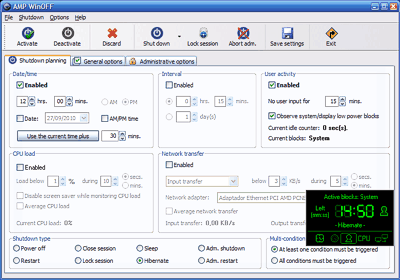
AMP WinOFF is an utility for scheduling the shutdown of Windows computers, with several shutdown conditions and fully configurable. Some of its features are:
Several modes/conditions for shutdown planification:
At certain date/time (e.g. 12:00 AM).
After a period of time (e.g. 1 hour and 15 minutes).
When there isn't user activity (i.e. no mouse/keyboard input).
When there isn't CPU activity.
When there isn't network activity.
Option of set several conditions at the same time for the planification. Examples:
Shut down at 08:00 PM or when there is no user activity for 15 minutes.
Shut down when the CPU load is below than 1% and the network transfer is below than 1Kb/s.
Several types of shutdown: power off, restart, close session, lock session, administrative shutdown/restart, sleep and hibernate.
Immediate shutdown and session lock from the taskbar icon menu.
Several security options including anti-close protection and password protected access to the configuration.
Option of showing a display with the active shutdown planification.
Option of executing a program, capturing the desktop, and/or hang up the modem before the shutdown.
Command line support for batch processing.
Dual English/Spanish version.


 kalo shutdown kompom xleh on balik
 sory2 silap penjelasan