BTC USD 85,092.1 Gold USD 4,140.83
Time now: Jun 1, 12:00 AM

Q & A Xiaomi's YI 4K Action Camera

ak punya playstore hilang lepas format,

macam mana nk solve eak.

best xiomi ni boleh tengok movie, anime, citer cina paling banyak online.

xyah masuk web bagai, dah tersedia.

skrng ni playstore problem huwaa... shahdu nye. help help
 
Install Google Play Store on Mi3, Mi4, Redmi 1S Note

Install Google Play Store on Mi3, Mi4, Redmi 1S Note

Step 1.
Open the Mi Market On your Phone, Once the market is open, it’ll ask for Sign in with account or Sign up if you don’t have Xiaomi Account. You need to sign in just like play store to install apps

Step 2.
Once the market is open, just search for Google and hit install button. See the screenshot below:-

Mi3-Google-Installer.jpg


Step 3.

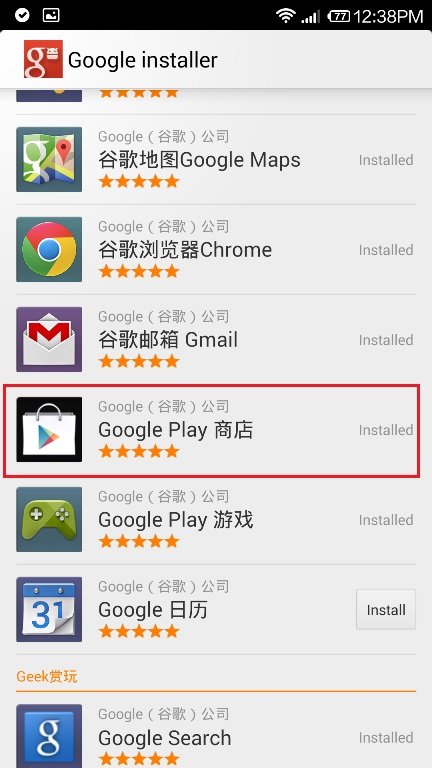
Once the installer is installed you will see the new “Google Installer” icon on your homescreen. Launch the application and you will see the list of all Google Apps. From here just install “Google Play Store”. Rest of other app you can install from the Google Play Store apps.

Install-Google-PLay-Store.jpg


Once installation is done just launch Play Store and Enjoy all the app
 
problem solve yeay.

thx pakcik google.

much much.
 
50 ribu powerbank semalam bleh habis kejap jer...
macam tipooo jer...
 
lama plak tggu mi4 ni
 
Back
Top
Log in Register