
froze2icy
Junior Member
- Messages
- 56
- Joined
- Jul 14, 2013
- Messages
- 56
- Reaction score
- 14
- Points
- 16
Android APN setting
1) Home -> Menu -> Settings -> Wireless & networks -> Mobile networks -> Access Points Name
2) Menu -> New APN
==============================
APN SETTING FOR MAXIS (3G)
==============================
Maxis Mobile Internet 3G
Access point name : unet
Username : (empty)
Password : (empty)
Account name : Maxis 3G WAP
Proxy server address : 202.75.133.49
Proxy server port : 80
Homepage : http://wap.maxis.com.my/
MMS 3G
Access point name : unet
Username : (empty)
Password : (empty)
Account name : Maxis 3G MMS
Proxy server address : 202.75.133.49
Proxy server port : 80
Service center address : http://172.16.74.100:10021/mmsc
*The rest of the field is blank.
===============================
APN SETTING FOR MAXIS (2G)
===============================
Maxis Mobile Internet 2G
Access point name : net
Username : (empty)
Password : (empty)
Account name : Maxis WAP 2.0
Proxy server address : 202.75.133.49
Proxy server port : 80
Homepage : http://wap.maxis.com.my/
MMS 2G
Access point name : net
Username : (empty)
Password : (empty)
Account name : Maxis MMS 2.0
Proxy server address : 202.75.133.49
Proxy server port : 80
Service center address : http://172.16.74.100:10021/mmsc
*The rest of the field is blank.
============================
APN SETTING FOR CELCOM
============================
Celcom 3G Setting
Name: celcom3g
APN: celcom3g
Proxy: 010.128.001.242
Port: 8080
Celcom MMS Setting
Server: http://mms.celcom.net.my
Proxy: 010.128.001.242
Port: 8080
*The rest of the field is blank.
=========================
APN SETTING FOR DIGI
=========================
DiGi APN
Name : DiGi Internet
APN: diginet
MCC: 502
MNC: 16
APN Type: default
(Others, blank)
DIGI MMS
APN: digimms
username: mms
password: mms
Proxy: 203.092.128.160
Port: 80
MMSC: http://mms.digi.com.my/servlets/mms
MMS Proxy: 203.092.128.160
MMS Port: 80
MCC: 502
MNC: 16
APN Type: mms
*The rest of the field is blank.
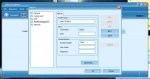
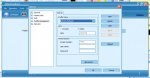
This setting also can be used for New Setting Profile Network for Modem.. just like tin this picture..
Picture 1 is the new setting for profile management using maxis broadband..

Picture 2 show the Celcom APN Setting (profle management)already added to this maxis application..

dont forget to 'THANKS'..
----------------------------------------
Selling Windows OS and Antivirus.. click here...
http://www.carigold.com/portal/forums/showthread.php?t=448659
or here
http://www.carigold.com/portal/forums/showthread.php?t=448656
1) Home -> Menu -> Settings -> Wireless & networks -> Mobile networks -> Access Points Name
2) Menu -> New APN
==============================
APN SETTING FOR MAXIS (3G)
==============================
Maxis Mobile Internet 3G
Access point name : unet
Username : (empty)
Password : (empty)
Account name : Maxis 3G WAP
Proxy server address : 202.75.133.49
Proxy server port : 80
Homepage : http://wap.maxis.com.my/
MMS 3G
Access point name : unet
Username : (empty)
Password : (empty)
Account name : Maxis 3G MMS
Proxy server address : 202.75.133.49
Proxy server port : 80
Service center address : http://172.16.74.100:10021/mmsc
*The rest of the field is blank.
===============================
APN SETTING FOR MAXIS (2G)
===============================
Maxis Mobile Internet 2G
Access point name : net
Username : (empty)
Password : (empty)
Account name : Maxis WAP 2.0
Proxy server address : 202.75.133.49
Proxy server port : 80
Homepage : http://wap.maxis.com.my/
MMS 2G
Access point name : net
Username : (empty)
Password : (empty)
Account name : Maxis MMS 2.0
Proxy server address : 202.75.133.49
Proxy server port : 80
Service center address : http://172.16.74.100:10021/mmsc
*The rest of the field is blank.
============================
APN SETTING FOR CELCOM
============================
Celcom 3G Setting
Name: celcom3g
APN: celcom3g
Proxy: 010.128.001.242
Port: 8080
Celcom MMS Setting
Server: http://mms.celcom.net.my
Proxy: 010.128.001.242
Port: 8080
*The rest of the field is blank.
=========================
APN SETTING FOR DIGI
=========================
DiGi APN
Name : DiGi Internet
APN: diginet
MCC: 502
MNC: 16
APN Type: default
(Others, blank)
DIGI MMS
APN: digimms
username: mms
password: mms
Proxy: 203.092.128.160
Port: 80
MMSC: http://mms.digi.com.my/servlets/mms
MMS Proxy: 203.092.128.160
MMS Port: 80
MCC: 502
MNC: 16
APN Type: mms
*The rest of the field is blank.
This setting also can be used for New Setting Profile Network for Modem.. just like tin this picture..
Picture 1 is the new setting for profile management using maxis broadband..
Picture 2 show the Celcom APN Setting (profle management)already added to this maxis application..
dont forget to 'THANKS'..
----------------------------------------
Selling Windows OS and Antivirus.. click here...
http://www.carigold.com/portal/forums/showthread.php?t=448659
or here
http://www.carigold.com/portal/forums/showthread.php?t=448656
Attachments
-
 34.6 KB Views: 109
 -
 35.6 KB Views: 109


