If the issue still exists, could you please let us know when the issue will occur? Does it occur after resuming from the third party screensaver? If this is the situation, the issue should be related to the screen saver. It is recommended using other screen saver instead.
Otherwise, if this is not the situation, please check if the issue occurs in Clean Boot. If the issue disappears in the Clean Boot environment, we can use a 50/50 approach to quickly narrow down which entry is causing the issue. Also, please go to Control Panel -> View by: Large icons -> Taskbar and Start Menu -> uncheck "Auto-hide the taskbar" -> click OK. Please check if the issue can be resolved.
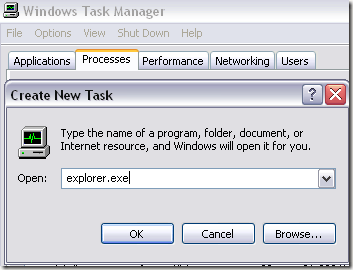
Besides, please try add explorer.exe process to the system by the steps below:
1. Press Ctrl+Shift+Esc combine key to bring up Task Manager.
2. Click File -> New Task (Run…).
3. Type explorer.exe in to the text box and then press Enter.