
srekcah
Fun Poster
- Messages
- 481
- Joined
- Dec 9, 2009
- Messages
- 481
- Reaction score
- 35
- Points
- 20
This WMP theme only for x86 build 7600

Download
1. Unable UAC
2. Restart
3. Take ownership of wmploc.dll.(C\Windows\System32 folder and locate wmploc.dll)
4. Rename the default file to wmploc.dll.old(at least u have file backup if anything happen)
5. Copy the custom wmploc.dll that u already download n paste.
6. Restart n now u have new theme for u're WMP.
7.x forget to turn on UAC back after that.
Gud Luck!#:-S
How to Create a Take Ownership Shortcut in Windows 7:
Just download and open the zip file below, and right click on the extracted .reg file and click on merge.
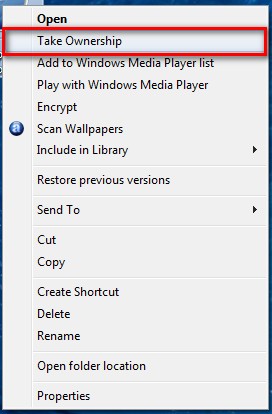
Right click on whatever you want to own and and select take ownership, it works and I have used it heaps.
DON'T FORGET TO CREATE RESTORE POINT BEFORE DOING SOME CHANGING!
Download
1. Unable UAC
2. Restart
3. Take ownership of wmploc.dll.(C\Windows\System32 folder and locate wmploc.dll)
4. Rename the default file to wmploc.dll.old(at least u have file backup if anything happen)
5. Copy the custom wmploc.dll that u already download n paste.
6. Restart n now u have new theme for u're WMP.
7.x forget to turn on UAC back after that.
Gud Luck!#:-S
How to Create a Take Ownership Shortcut in Windows 7:
Just download and open the zip file below, and right click on the extracted .reg file and click on merge.
Right click on whatever you want to own and and select take ownership, it works and I have used it heaps.
DON'T FORGET TO CREATE RESTORE POINT BEFORE DOING SOME CHANGING!
Last edited:


