myroadtax.com
CG Top Poster Club

- Messages
- 25,906
Paid Membership
- Joined
- Feb 12, 2014
- Messages
- 25,906
- Reaction score
- 585
- Points
- 161
- Download percuma bermula 29 Julai 2015
- Promosi upgrade percuma selama setahun, jika tidak upgrade selepas tempoh kena bayar untuk upgrade
- Boleh cuba Windows 10 selama 30 hari, jika tak suka boleh downgrade
- Harga Home (USD119) dan Premium (USD199). Upgrade Home to Premium(USD99).
- Lesen kekal percuma, dan bukan kena bayar selepas setahun penggunaan macam Antivirus
- Khas untuk semua pengguna Windows 7 dan Windows 8 (upgrade sahaja)
- Belian PC dan Laptop baru dengan OS OEM asal Windows 7 & 8 akan dapat upgrade percuma
- Perisian cetak rompak boleh update, tetapi masih kira non genuine windows
- Word, Excel and PowerPoint built in
- [STRIKE]Boleh booking dahulu[/STRIKE] Sudah boleh download (rujuk bawah)

Siapa yang nak install tu kena sediakan product key windows asal yang original.
Boleh gunakan software ini untuk recover product key kalau susah nak cari lagi2 untuk OEM. Kalau retail version boleh cari kotak atau CD case.
http://www.nirsoft.net/utils/product_cd_key_viewer.html
Pastikan version Windows yang di muat turun sama taraf dia dengan version Windows sedia ada.

Tetapi ada satu lagi version yang tidak masuk senarai.
Windows 8.1 Single Language ---> Windows 10 Home Single Language
Sekarang baru WIndows tidak paksa saya masukkan product key. Sebenarnya Windows mencari product key berdasarkan ISO yang kita download.
Jadi mesti download yang betul.
Windows 10 editions compare Table of features.
korang pernah jd camni bile nk upgrade?

1. pergi dekat start>control panel>Clock, Language and Region>Region and Language
2. Tukar format kepada English(United States)
3. Location United States
3. Administrative>Change system locale>English(United States)
jangan lupe pilih masa nak upgrade install tu, pilih version windows 10 yg sama dgn windows 7/8 korang, cth kalo win7 ultimate install win10pro, win7 home install win10home
Saja nak share dengan geng CG. Bagi siapa yang nak download Windows 10 pakai IDM (direct-download) yang server kelajuan tahap maxima boleh masuk website ni :
GETINTOPC
Kalau siapa ada keraguan nak buat fresh install ke nak upgrade je ke, lebih baik install dalam Virtual Machine dulu sebelum buat keputusan. Godek-godek dulu macam mana Windows 10 ni, baru buat keputusan sama ada nak buat fresh install ataupun nak upgrade aje.
Untuk driver pulak, boleh pakai Driverpack Solution (offline installer) all-in-one punya driver.
DRIVERPACK SOLUTION
Cuma yang ini download dia pakai torrent. Kalau nak iso dia dan direct download macam Windows 10 iso dekat atas tu, cuba check dalam website (Getintopc) tu pun kalau tak silap dorang ada upload dekat server dorang jugak kot.
Setakat yang saya dah cuba, Windows 10 lebih baik dan bagus dari Windows 8/8.1 dari segi kelajuan, grafik unik termasuk icon windows 10 banyak dorang ubah dan paling penting time nak boot masuk windows tu lagi laju dari windows 8/8.1. Ini pengalaman saya lah, korang punya macam mana pulak?
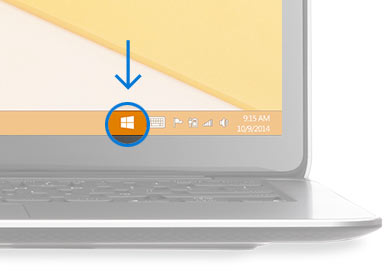
Bagi mereka yang memilih untuk tidak upgrade, sila rujuk grafik bawah:

Bagi mereka yang teringin sangat nak upgrade ke Windows 10 dan tidak mahu guna perisian cetak rompak boleh cuba cara ini. Saya tengok ramai geng forum sebelah buat.
1. Beli lesen atau product key Win 7 atau Win 8 dan install atas PC.
2. Lepas tu buat system update.
3. Baru buat Windows 10 upgrade.
Tetapi hati2 takut kena scam beli product key tipu. Saya semak IPMart, Lelong dan Lazada. Ini yang termurah:
1. MICROSOFT WINDOWS 7 STARTER (OEM) ---> RM175
http://ho.lazada.com.my/SHC8Ya
2. Microsoft Windows 7 Starter ---> RM185
http://ho.lazada.com.my/SHC8Ye
Starter Pack boleh upgrade ke Windows 10 juga kan? Macam yang Netbook guna tu.
Boleh kongsikan sini kalau jumpa mana2 tempat yang jual lesen Windows 7 dan Windows 8 murah.
Mana yang sudah upgrade tu pastikan ia adalah betul2 Windows 10 final version dan bukan beta atau preview version. Perasan banyak version yang diedarkan di torrent bukan final version (build 10240).
Sila run "winver" dekat command line atau search box.

Pastu Windows 10 sudah activated.

Ada caranya tuan. Pastikan semua file sudah buat backup.
1. Upgrade Win 7 ke Win 10 dahulu.
2. Windows akan berikan product key baru untuk Win 10.
3. Guna perisian produkey untuk copy dan save product key Win 7 dan Win 10.
4. Lepas tu boleh terus buat clean install Win 10.
Microsoft sudah confirm cara ini berhasil. Dia juga sudah jamin bahawa product key Windows 10 yang kita dapat setelah upgrade itu adalah kekal, ia bukan sementara.

Windows (BIOS OEM Key) adalah product key asal laptop, boleh jadi Windows 7 atau Windows 8.
Download ProduKey: http://www.nirsoft.net/utils/product_cd_key_viewer.html
Boleh rujuk sini tuan:
>>> Panduan download Windows 10 ISO
>>> Panduan upgrade Windows 8.1 ke Windows 10 guna USB
Untuk mengetahui windows 10 keyboard shortcuts boleh rujuk pada website kat sini 32 new Keyboard Shortcuts In Windows 10. Saya pon baru belajar.
Acer Aspire R11, first with Windows 10
ACER Malaysia melancarkan model komputer riba kompak boleh ubah terbaharu, Acer Aspire R 11 dilengkapi dengan sistem operasi baharu, Windows 10, sekali gus menjadikannya peranti pertama yang mempunyai perisian itu di pasaran.

Selanjutnya di : http://www.bharian.com.my/node/72851
4 syarikat pengeluar komputer telah menyenaraikan model-model device yang telah diuji dan layak untuk upgrade ke Windows 10. Anda boleh semak link di bawah nie mungkin device anda ada disenaraikan:
Acer : http://www.acer.com.my/ac/en/MY/content/windows10-eligible-models
Dell : http://www.dell.com/support/article/my/en/mydhs1/SLN297954
Lenovo : https://support.lenovo.com/my/ms/documents/ht103535
Asus : http://www.asus.com/event/2015/osupgrade/upgrade.html?12389293
Di bawah disenaraikan antivirus software yang compatible dengan Windows 10. Perlu diingatkan sebelum nak install antivirus yang baru pastikan tiada antivirus lain di dalam pc sebab dua antivirus software yang berlainan boleh mengganggu dan menimbulkan masalah kepada pc anda.
Avast
- Pro Antivirus
- Internet Security
- Premier
Link https://blog.avast.com/2015/06/03/latest-versions-of-avast-compatible-with-windows-10/
AVG
- Antivirus
- Internet Security
Link http://now.avg.com/free-windows-10-update/
Avira
- Antivirus Pro
- Internet Security
- Ultimate Protection Suite
Link http://www.avira.com/en/support-for-home-knowledgebase-detail/kbid/1699
Bitdefender
- Antivirus Plus
- Internet Security
- Total Security
- Total Security Multi-Device
- Family Pack
Link http://www.hotforsecurity.com/blog/bitdefender-products-ready-to-embrace-windows-10-12221.html
BullGuard
- Antivirus Plus
- Internet Security
Link https://www.bullguard.com/de/about/release-notes.aspx
Comodo
- Antivirus
- Internet Security
- Firewall
Link https://forums.comodo.com/news-announcements-feedback-cis/comodo-internet-security-8204674-with-win10-support-is-released-t112353.0.html
Dr.Web
Not compatible
eScan
Not compatible
Emsisoft
Not compatible
ESET
- NOD32 Antivirus
- Smart Security
Link https://forum.eset.com/topic/5409-v9-compatibility-with-windows-10/#entry30283
F-Secure
- Antivirus
- Internet Security
- SAFE
Link https://community.f-secure.com/t5/Security-for-PC/Will-my-F-Secure-security/ta-p/72624
Kaspersky
- Antivirus*
- Internet Security*
- Total Security*
Link http://support.kaspersky.com/
Malwarebytes
- Anti-Malware Free
- Anti-Malware Premium
- Anti-Exploit Free
- Anti-Exploit Premium
Link https://blog.malwarebytes.org/news/2015/07/malwarebytes-anti-malware-now-supports-windows-10/
Norton
- Norton Antivirus
- Internet Security
- 360
- Security
- Security with Backup
Link https://support.norton.com/sp/en/us/home/current/solutions/v107701320_EndUserProfile_en_us
Panda Security
- Antivirus Pro
- Internet Security
- Global Protection
- Gold Protection
Link www.pandasecurity.com/mediacenter/news/panda-security-compatible-with-windows-10/
Sophos
Not compatible
Trend Micro
- AntiVirus+ Security
- Internet Security
- Maximum Security
- Premium Security
Link http://esupport.trendmicro.com/en-us/home/pages/technical-support/premium-security-10/1111603.aspx
VIPRE
- Antivirus
- Internet Security
http://support.vipreantivirus.com/support/solutions/articles/1000192510-upgrading-to-windows-10-/
Webroot
- SecureAnywhere AntiVirus
- SecureAnywhere Internet Security Plus
- SecureAnywhere Internet Security Complete
https://community.webroot.com/t5/Announcements-and-Release-Notes/PC-Agent-Release-Notes-For-Version-9-0-0-64/m-p/206944/thread-id/4633
ZoneAlarm
Not compatible
Sumber dari Antivirus-4U.com
Windows 10 IoT Core, a version of Windows for embedded devices, is now available from Microsoft and looks to be an interesting alternative to Raspbian and other Linux-based portable OSes.
Sumber:
http://techcrunch.com/2015/08/12/windows-10-is-now-available-for-the-raspberry-pi/
http://blogs.windows.com/buildingapps/2015/08/10/hello-windows-10-iot-core/
Download: http://ms-iot.github.io/content/en-US/Downloads.htm
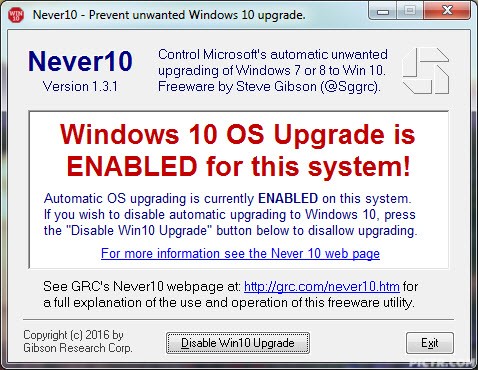
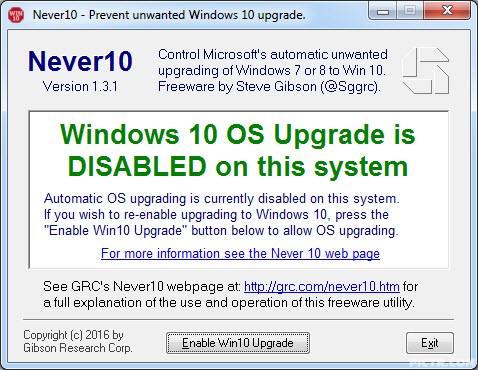
Ok, untuk sape2 yang x nak upgrade ke Windows 10, follow instructions kat sini https://support.microsoft.com/en-us/kb/3095675.
GRC (Gibson Research Coorporation) ada offer one click enable/disable Windows 10 upgrade notification.
Blh download kat sini:
https://www.grc.com/never10.htm
Last edited: