
tyco
Active+ Member

- Messages
- 4,115
- Joined
- Sep 16, 2010
- Messages
- 4,115
- Reaction score
- 1,680
- Points
- 111
Cara ini boleh digunakan di Windows XP/Vista/7.
Step 1
Buka Notepad dan copy code di bawah serta paste di dalam Notepad tadi.
Option Explicit
On Error Resume Next
Dim Wsh, Time1, Time2, Result, PathFile, MsgResult, MsgA, AppName, KeyA, KeyB, TimeDiff
MsgA = "Please close all running applications and click on OK."
KeyA = "HKEY_CURRENT_USER\Software\RestartTime\"
KeyB = "HKEY_CURRENT_USER\Software\Microsoft\Windows\CurrentVersion\Run\RestartTime"
AppName = "[XLAWS Knowledge] Reboot Time"
Set Wsh = CreateObject("WScript.Shell")
PathFile = """" & WScript.ScriptFullName & """"
Result = wsh.RegRead(KeyA & "Times")
if Result = "" then
MsgResult = Msgbox (MsgA, vbOKCancel, AppName)
If MsgResult = vbcancel then WScript.Quit
Wsh.RegWrite KeyA & "Times", left(Time,8), "REG_SZ"
Wsh.RegWrite KeyB, PathFile, "REG_SZ"
Wsh.Run "cmd /c Shutdown -r -t 00", false, 0
else
Wsh.RegDelete KeyA & "Times"
Wsh.RegDelete KeyA
Wsh.RegDelete KeyB
TimeDiff = DateDiff("s",Result,left(Time,8))
MsgBox "Your computer reboots in " & TimeDiff & " seconds", VbInformation, AppName
end if
wscript.Quit
Step 2
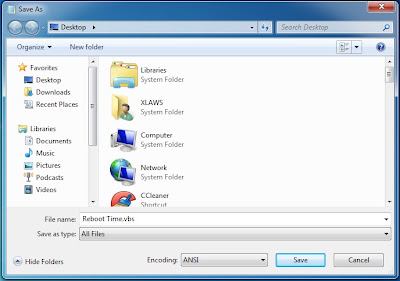
Kemudian save Notepad tersebut sebagai Reboot Time.vbs atau apa-apa nama yang korang mahu dan pilih All Files untuk save as type:. Tapi kena ingat pastikan selepas nama file letak .vbs!.
Bagaimana Ianya Berfungsi?
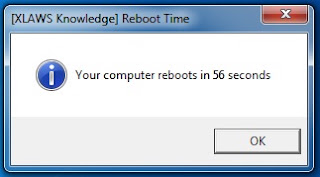
Untuk mengira reboot time windows. Kami menggunakan VB Script (Visual BASIC Scripting Edition). Untuk lebih lanjut lagi, Script ini akan menulis value di (HKCU\Software\Microsoft\Current Version\run) dan akan muncul kembali di desktop selepas korang restart PC. Apabila proses reboot sedang berjalan, script tadi akan merekod masa serta mewujudkan key variable untuk menyimpan data yang direkod, sehinggalah sampai di desktop korang dan muncul lah jumlah masa direkodkan tadi. Selepas itu, value yang diwujudkan tadi akan di buang.
Jadi inilah Reboot Time XLAWS. Boleh la tahan. Hahaha =D
Step 1
Buka Notepad dan copy code di bawah serta paste di dalam Notepad tadi.
Option Explicit
On Error Resume Next
Dim Wsh, Time1, Time2, Result, PathFile, MsgResult, MsgA, AppName, KeyA, KeyB, TimeDiff
MsgA = "Please close all running applications and click on OK."
KeyA = "HKEY_CURRENT_USER\Software\RestartTime\"
KeyB = "HKEY_CURRENT_USER\Software\Microsoft\Windows\CurrentVersion\Run\RestartTime"
AppName = "[XLAWS Knowledge] Reboot Time"
Set Wsh = CreateObject("WScript.Shell")
PathFile = """" & WScript.ScriptFullName & """"
Result = wsh.RegRead(KeyA & "Times")
if Result = "" then
MsgResult = Msgbox (MsgA, vbOKCancel, AppName)
If MsgResult = vbcancel then WScript.Quit
Wsh.RegWrite KeyA & "Times", left(Time,8), "REG_SZ"
Wsh.RegWrite KeyB, PathFile, "REG_SZ"
Wsh.Run "cmd /c Shutdown -r -t 00", false, 0
else
Wsh.RegDelete KeyA & "Times"
Wsh.RegDelete KeyA
Wsh.RegDelete KeyB
TimeDiff = DateDiff("s",Result,left(Time,8))
MsgBox "Your computer reboots in " & TimeDiff & " seconds", VbInformation, AppName
end if
wscript.Quit
Step 2
Kemudian save Notepad tersebut sebagai Reboot Time.vbs atau apa-apa nama yang korang mahu dan pilih All Files untuk save as type:. Tapi kena ingat pastikan selepas nama file letak .vbs!.
Bagaimana Ianya Berfungsi?
Untuk mengira reboot time windows. Kami menggunakan VB Script (Visual BASIC Scripting Edition). Untuk lebih lanjut lagi, Script ini akan menulis value di (HKCU\Software\Microsoft\Current Version\run) dan akan muncul kembali di desktop selepas korang restart PC. Apabila proses reboot sedang berjalan, script tadi akan merekod masa serta mewujudkan key variable untuk menyimpan data yang direkod, sehinggalah sampai di desktop korang dan muncul lah jumlah masa direkodkan tadi. Selepas itu, value yang diwujudkan tadi akan di buang.
Jadi inilah Reboot Time XLAWS. Boleh la tahan. Hahaha =D


