
Xploit Machine
CG Hardcore Club

- Messages
- 73,788
Top Poster #8

- Joined
- Nov 23, 2012
- Messages
- 73,788
- Reaction score
- 7,754
- Points
- 916
Get Ready For Windows 11 Version 25H2
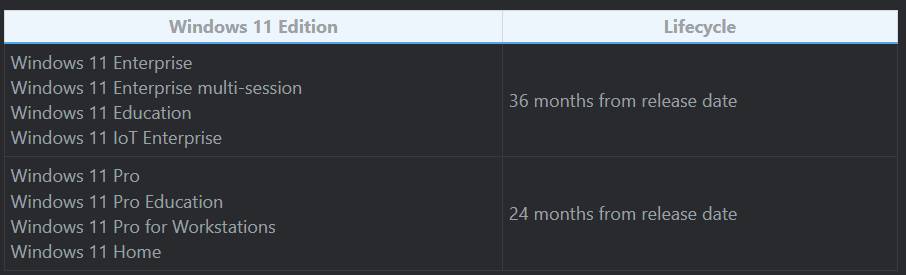
How easy is it to move to Windows 11, version 25H2? As easy as a quick restart if you're on version 24H2! Today, Windows 11, version 25H2 became available to the Windows Insider community, in advance of broader availability planned for the second half of 2025. Get ready for a reset of the 36-month support lifecycle for Enterprise and Education editions and the 24-month lifecycle for Pro, Pro Education, and Pro for Workstation editions!
As Easy As Restarting - The Benefits Of The Shared Servicing Branch
Over the years, you've experienced regular optimizations to the development and servicing of each version of Windows. Your installations are faster, and your experiences are more seamless. That's because combined servicing stack updates (SSUs) with latest cumulative updates (LCUs) have reduced package size by 40%. One of the most significant improvements that make these benefits possible is the Windows shared servicing branch. This capability applies the same technology used for the monthly update process to the annual feature updates. For you, it's a familiar, fast, and reliable update experience. This process is called "feature updates via servicing," and the updates are implemented through enablement packages (eKB). An eKB is an update package that helps update a device to the next version of Windows with a single restart that reduces downtime. Note: Not all Windows versions share the same servicing branch. The first update that used this process was from Windows 10, version 1903 to Windows 10, version 1909. To learn more, download and read the whitepaper Windows updates and the shared servicing model.
Moving From Windows 11, Version 24H2 To Version 25H2
Windows 11, version 24H2 and version 25H2 use a shared servicing branch. Here's what this means for your update experience. New features we develop for Windows 11, version 25H2 are part of the version 24H2 branch. When the new code is complete, we include it in the monthly LCUs for Windows 11, version 24H2 in a Disabled state. Think of it as having the new feature code slowly staged on devices running version 24H2—yet another reason to stay up to date with monthly Windows updates!. The code remains disabled on the device until it receives the eKB. The eKB changes flags in the staged code from Disabled to Enabled. When you restart the device, the new features become enabled, and you're officially on Windows 11, version 25H2!

To confirm that the update took place, check your version and OS build number in Windows Settings > System > About.
Windows 11, version 24H2 and version 25H2 share the same source code, with only the additional features turned on. Therefore, there should be no impact on compatibility between the two. This doesn't mean that you shouldn't test, but you can focus your tests on the new features rather than a full complement of OS, application, or device compatibilities.
Moving From Earlier Versions To Windows 11, Version 25H2
Since versions earlier than Windows 11, version 24H2 do not share the same servicing branch as Windows, version 25H2, the simple update via an eKB isn't possible. The normal feature update process is the best option. Use Windows Update or Windows Autopatch. For Windows 10 devices or for new Windows 11 devices that you're deploying, first upgrade them to Windows 11, version 24H2 to make the transition to version 25H2 as simple and quick as possible when it's available. Stay protected and productive with Windows 11, version 25H2 - Whichever way you get to Windows 11, version 25H2, devices will benefit from a fresh support lifecycle, which begins on the date of its general availability:
Interested in previewing the upcoming features? Enroll in the Windows Insider Program and join the Dev Channel today.
Windows Update - https://support.microsoft.com/windows/insta...84-b5e0412c556a
Windows AutoPatch - https://learn.microsoft.com/windows/deploym...dows-autopatch/
How easy is it to move to Windows 11, version 25H2? As easy as a quick restart if you're on version 24H2! Today, Windows 11, version 25H2 became available to the Windows Insider community, in advance of broader availability planned for the second half of 2025. Get ready for a reset of the 36-month support lifecycle for Enterprise and Education editions and the 24-month lifecycle for Pro, Pro Education, and Pro for Workstation editions!
As Easy As Restarting - The Benefits Of The Shared Servicing Branch
Over the years, you've experienced regular optimizations to the development and servicing of each version of Windows. Your installations are faster, and your experiences are more seamless. That's because combined servicing stack updates (SSUs) with latest cumulative updates (LCUs) have reduced package size by 40%. One of the most significant improvements that make these benefits possible is the Windows shared servicing branch. This capability applies the same technology used for the monthly update process to the annual feature updates. For you, it's a familiar, fast, and reliable update experience. This process is called "feature updates via servicing," and the updates are implemented through enablement packages (eKB). An eKB is an update package that helps update a device to the next version of Windows with a single restart that reduces downtime. Note: Not all Windows versions share the same servicing branch. The first update that used this process was from Windows 10, version 1903 to Windows 10, version 1909. To learn more, download and read the whitepaper Windows updates and the shared servicing model.
Moving From Windows 11, Version 24H2 To Version 25H2
Windows 11, version 24H2 and version 25H2 use a shared servicing branch. Here's what this means for your update experience. New features we develop for Windows 11, version 25H2 are part of the version 24H2 branch. When the new code is complete, we include it in the monthly LCUs for Windows 11, version 24H2 in a Disabled state. Think of it as having the new feature code slowly staged on devices running version 24H2—yet another reason to stay up to date with monthly Windows updates!. The code remains disabled on the device until it receives the eKB. The eKB changes flags in the staged code from Disabled to Enabled. When you restart the device, the new features become enabled, and you're officially on Windows 11, version 25H2!
To confirm that the update took place, check your version and OS build number in Windows Settings > System > About.
Windows 11, version 24H2 and version 25H2 share the same source code, with only the additional features turned on. Therefore, there should be no impact on compatibility between the two. This doesn't mean that you shouldn't test, but you can focus your tests on the new features rather than a full complement of OS, application, or device compatibilities.
Moving From Earlier Versions To Windows 11, Version 25H2
Since versions earlier than Windows 11, version 24H2 do not share the same servicing branch as Windows, version 25H2, the simple update via an eKB isn't possible. The normal feature update process is the best option. Use Windows Update or Windows Autopatch. For Windows 10 devices or for new Windows 11 devices that you're deploying, first upgrade them to Windows 11, version 24H2 to make the transition to version 25H2 as simple and quick as possible when it's available. Stay protected and productive with Windows 11, version 25H2 - Whichever way you get to Windows 11, version 25H2, devices will benefit from a fresh support lifecycle, which begins on the date of its general availability:
Interested in previewing the upcoming features? Enroll in the Windows Insider Program and join the Dev Channel today.
Windows Update - https://support.microsoft.com/windows/insta...84-b5e0412c556a
Windows AutoPatch - https://learn.microsoft.com/windows/deploym...dows-autopatch/

