FireFaucet is an Auto Pilot & Upgradeable Faucet for 12 types of free Coins
Step 1:
Firefaucet only pay to FaucetHub wallet. Register FaucetHub wallet if you don’t have any. Many free faucet will pay to faucethub wallet.
Faucet Hub register link: http://swarife.com/6VZ6
(Note: The link attached will have 5 seconds ads. Don’t worry, it’s safe to use. Just click “skip ads” at the right upper corner after 5 seconds)
Please PM if got any queries with Faucet Hub wallet.
Step 2:
Once the Faucet Hub wallet is ready, we can register FireFaucet now.
Register Link : http://swarife.com/6Vd1
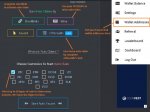
Go to “wallet addresses” put in your Faucet Hub wallet address (refer to attachment 2). We need to put in Faucet Hub wallet address as the auto collect will credit the coins directly to Faucet Hub wallet.
Go to “setting” setup the timer of auto claim.
My setting as follow:
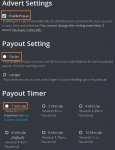
1) Enable Popups – to activate the collection of BTC & ETH
2) Payout Setting – Faster (this will cost 2x of auto claim but can auto claim every minutes)
3) Payout Timer – 1 Minute (claim every min with 2x coins and directly credit to faucet hub wallet)
You may try other setting but take note that we are only allow to change setting for 3 times.
Step 3:
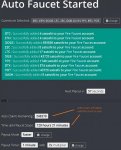
After done the setting, we will need to collect “auto claim” by complete Shortlinks, collect from faucet and complete offerwalls. Then press “start Auto Faucet”, the auto claim will be activated.
This Auto Faucet is upgradeable to collect more coins.
We will accumulate “activity points” when do shortlinks, faucet, mining or offerwalls which will allow us to level up for higher rewards.
FireFaucet Register Link : http://swarife.com/6Vd1
Happy Earning!!!
Step 1:
Firefaucet only pay to FaucetHub wallet. Register FaucetHub wallet if you don’t have any. Many free faucet will pay to faucethub wallet.
Faucet Hub register link: http://swarife.com/6VZ6
(Note: The link attached will have 5 seconds ads. Don’t worry, it’s safe to use. Just click “skip ads” at the right upper corner after 5 seconds)
Please PM if got any queries with Faucet Hub wallet.
Step 2:
Once the Faucet Hub wallet is ready, we can register FireFaucet now.
Register Link : http://swarife.com/6Vd1
Go to “wallet addresses” put in your Faucet Hub wallet address (refer to attachment 2). We need to put in Faucet Hub wallet address as the auto collect will credit the coins directly to Faucet Hub wallet.
Go to “setting” setup the timer of auto claim.
My setting as follow:
1) Enable Popups – to activate the collection of BTC & ETH
2) Payout Setting – Faster (this will cost 2x of auto claim but can auto claim every minutes)
3) Payout Timer – 1 Minute (claim every min with 2x coins and directly credit to faucet hub wallet)
You may try other setting but take note that we are only allow to change setting for 3 times.
Step 3:
After done the setting, we will need to collect “auto claim” by complete Shortlinks, collect from faucet and complete offerwalls. Then press “start Auto Faucet”, the auto claim will be activated.
This Auto Faucet is upgradeable to collect more coins.
We will accumulate “activity points” when do shortlinks, faucet, mining or offerwalls which will allow us to level up for higher rewards.
FireFaucet Register Link : http://swarife.com/6Vd1
Happy Earning!!!
Attachments
-
 40.4 KB Views: 79
 -
 39.5 KB Views: 65
 -
 58.3 KB Views: 72


