KeePass merupakan password management utiliti yang free untuk Windows.
Fleksible, user-friendly, leh simpan dalam USB drive (portable version).
Official website:
http://www.keepass.info/
Dalam forum ni ada yang mention, tapi xde specific thread pasal KeePass ni. Personally, aku pakai utiliti ni. Kira yang terbaik bila kita nak sesuatu yang "free".
Feature list yang available:
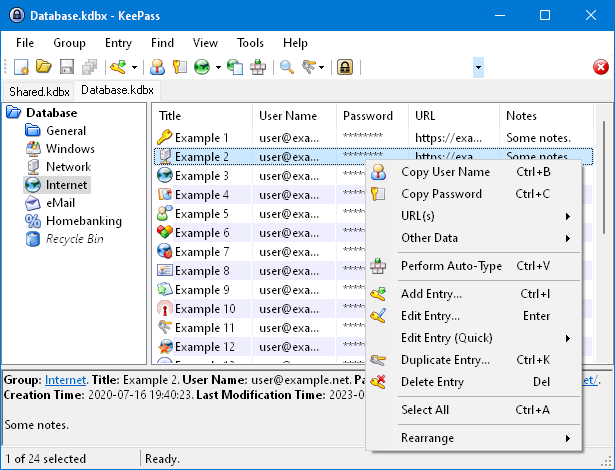
Screenshot list kat bawah, dari website KeePass:
Main windows
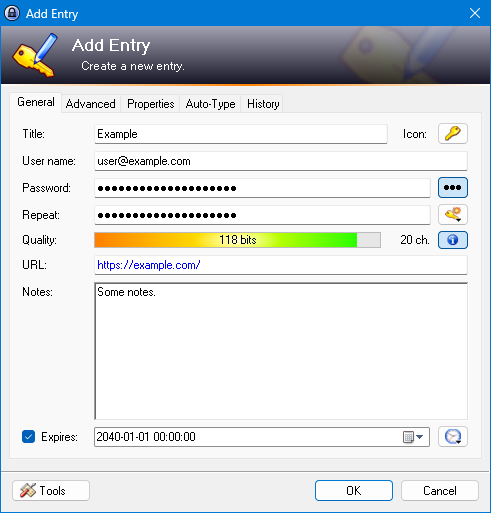
Adding a New Entry
Options

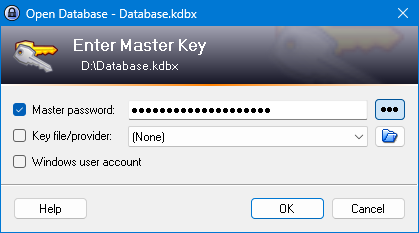
Entering the Master Password. Yang ni penting. Kalau pakai yg portable pastu USB drive hilang. Kemungkinan org tahu content dalam thumbdrive tu slim (dengan syarat master password punya strenth kene high laa).
Powerful Built-In Password Generator

Fleksible, user-friendly, leh simpan dalam USB drive (portable version).
Official website:
http://www.keepass.info/
Dalam forum ni ada yang mention, tapi xde specific thread pasal KeePass ni. Personally, aku pakai utiliti ni. Kira yang terbaik bila kita nak sesuatu yang "free".
Feature list yang available:
- Strong Security
- Multiple User Keys
- Portable and No Installation Required, Accessibility
- Export To TXT, HTML, XML and CSV Files
- Import From Many File Formats
- Easy Database Transfer
- Support of Password Groups
- Time Fields and Entry Attachments
- Auto-Type, Global Auto-Type Hot Key and Drag&Drop
- Intuitive and Secure Clipboard Handling
- Searching and Sorting
- Multi-Language Support
- Strong Random Password Generator
- Plugin Architecture
- Thrash function (kita delete entry, pastu rasa nak pakai semula leh check dalam Thrash Bin atau recover semula)
- Available utk Android, Windows Phone, iPhone/iPad, Blackberry (Unofficial KeePass Ports)
- Open Source!
Screenshot list kat bawah, dari website KeePass:
Main windows
Adding a New Entry
Options
Entering the Master Password. Yang ni penting. Kalau pakai yg portable pastu USB drive hilang. Kemungkinan org tahu content dalam thumbdrive tu slim (dengan syarat master password punya strenth kene high laa).
Powerful Built-In Password Generator
Last edited:


